Vizcom Plugins launch with Autodesk Fusion
Vizcom Plugins are here, starting with Autodesk Fusion. Push 3D models from Vizcom into Fusion at any stage, or bring Fusion models back into Vizcom to keep iterating. A live creative loop between ideation and engineering without rebuilding or reformatting.

Your best work happens in Vizcom. Today, it goes further.
We're launching Vizcom Plugins, a direct connection from your Vizcom workflow to the tools that help make your ideas real, faster.
It's the foundation of something we've been building toward: a connected ecosystem that keeps your creative vision intact from the first sketch all the way through to production.
And we're starting with the integration designers building for the physical world have been waiting for: Autodesk Fusion.
The problem we’re solving
The handoff between design and engineering has always been the friction point. Models get rebuilt from scratch, fidelity gets lost, and your original idea gets diluted by the time it reaches production.
We built Vizcom Plugins to change that.
What the Autodesk Fusion plugin unlocks
The Vizcom Autodesk Fusion integration is a two-way connection between design and engineering. It works at any stage of the creative process, not just when a model is final.
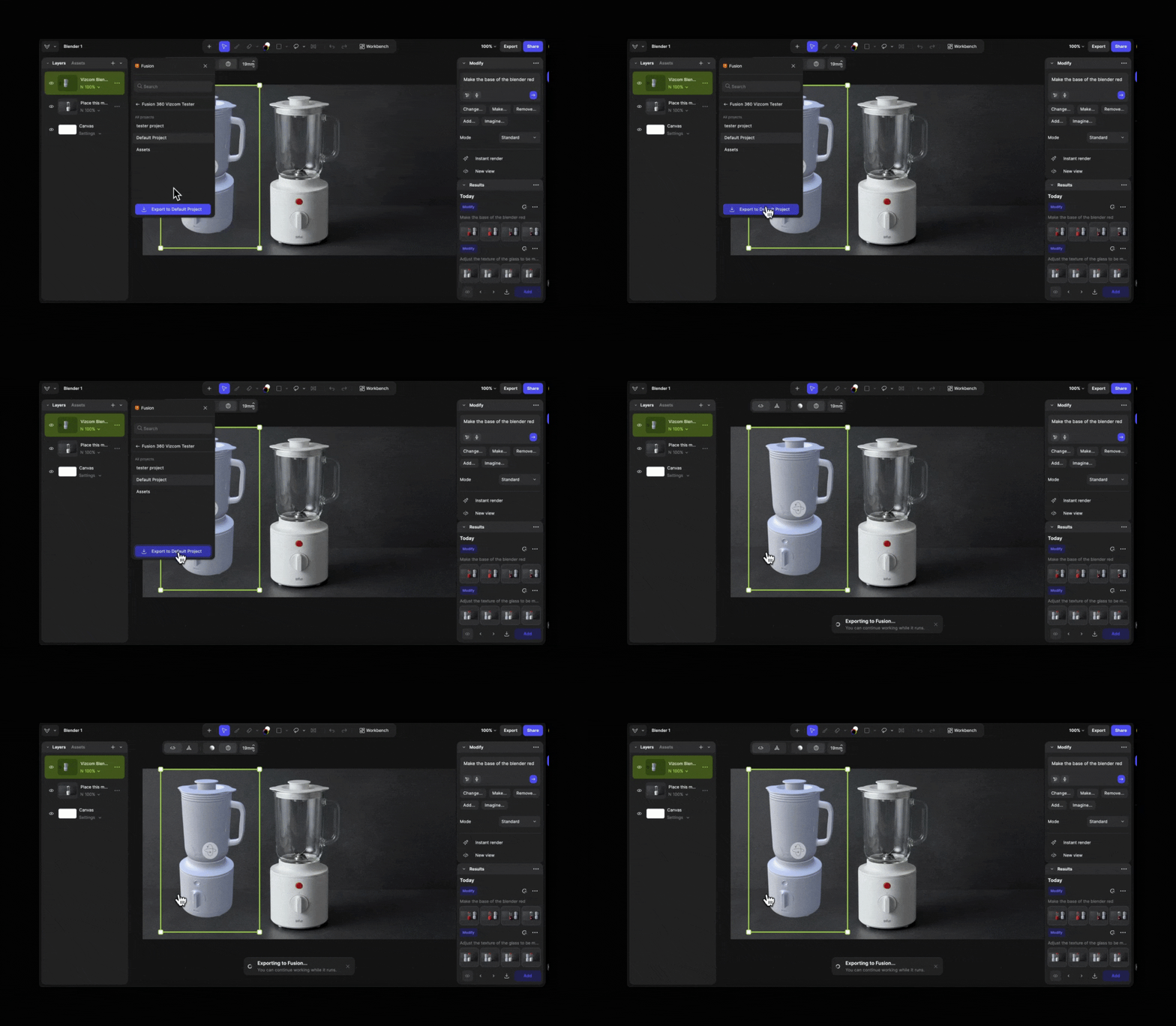
Push from Vizcom into Fusion
Take any 3D model directly from its layer in Vizcom and send it into Fusion, ready to refine dimensions, tolerances, and production details without rebuilding from scratch.
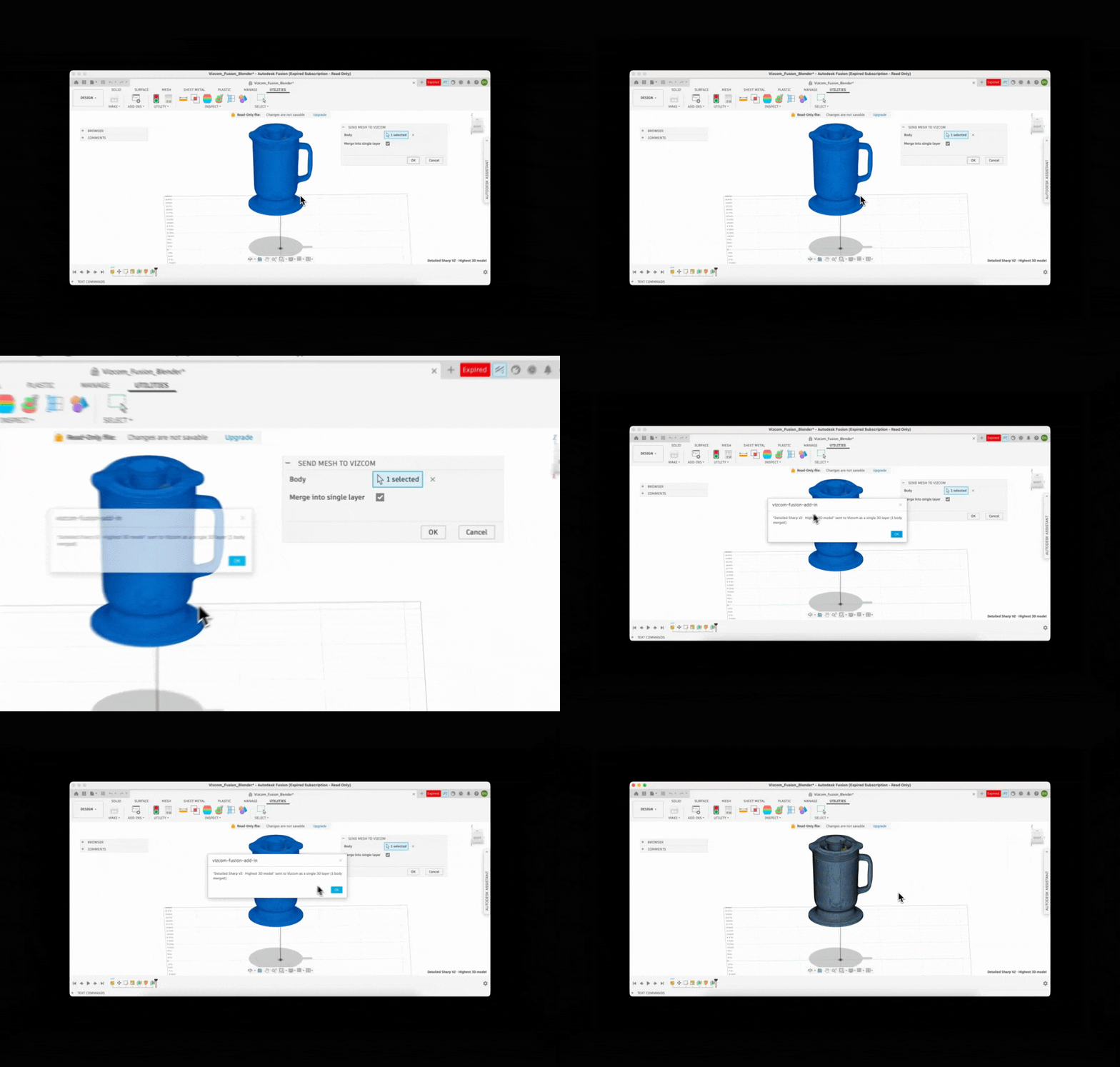
Pull from Fusion back into Vizcom
Already working in Fusion? Bring any model back into Vizcom to explore new design directions, iterate on form, and evolve the concept, then return it to Fusion when you're ready to continue engineering.
Your idea leads from start to finish as Vizcom assists with your ideation and visualization and Fusion prepares it for manufacturing.
No reformatting, no file gymnastics, no losing the thread of the original idea. Your vision stays intact the whole way through.
The Vizcom app is now live on the Autodesk Marketplace, download it for Mac or Windows.
This is just the beginning
Autodesk Fusion is the first Vizcom Plugin and it won't be the last.
Vizcom Plugins is how we're building the connective tissue between the creative process and every tool in the physical product development stack. More integrations are coming soon and each one is designed with the same principle in mind: your idea leads, and the tools follow.
Your best work starts in Vizcom, now it goes further than ever.
Get started
Want to see this workflow in action? Watch the tutorial:
Learn more ➡️ Visit User Docs
Try it out ➡️ Open Vizcom
Explore
Explore more blog posts & resources to get inspired
.webp)
Hatch Duo is a design studio based in San Jose built around a simple premise: great products hatch when two forces meet, your insight and their execution. Hatch's focus sits squarely in consumer packaged goods. For their latest collaboration with Vizcom, industrial designer Alec Comido wanted to see what he could design in one hour.

Explore color and material variations part-by-part without leaving Vizcom.


Frequently asked questions
Yes of course! Our starter plan is completely free, no credit card required. This is a great plan to explore vizcom with.
We accept all major credit and debit cards.
Admins (paid) – can edit files, manage workspace settings, billing, teams, and invite members. Editors (paid) – can edit files but not manage settings, billing, or teams. Viewers (free) – can only view files in read-only mode.
Team billing is handled centrally by the Admin. All paid seats, whether Admins or Editors, are included in a single invoice under the same billing cycle, while Viewers remain free and do not affect the cost.
Yes, you can. An Admin can update the plan in the billing settings, and the switch will take effect on the next billing cycle at the annual rate.
Yes, you own everything you create in Vizcom. For free users, while Vizcom may use generated images to improve its services, it does not claim ownership of your designs, concepts, or original ideas—you keep full rights to them. For paid users, your images and designs remain entirely private and are only used to deliver the service. Every design, concept, and image you create or upload is fully yours and kept confidential.
Vizcom does not use your data to train AI models if you’re on a paid plan. Everything you create stays private and is only used to provide the service. Free users may have their generated images included to help improve Vizcom’s services, but even then, Vizcom does not claim ownership of your designs, concepts, or original ideas—you retain full rights.