Design-to-Development Handoff: Documentation That Gets Built Right
Learn how to prepare design work for engineering handoff. Covers visual documentation, material decisions, design rationale, and communicating intent clearly.

The prototype comes back wrong. The proportions shifted, the material finish doesn't match your renders, or the assembly looks different from what you envisioned. Engineering built exactly what they interpreted from your files. The problem is that the interpretation didn't match your intent.
Multiple construction and project studies find that rework can consume anywhere from a few percent up to around 20 to 30% of total project costs in severe cases.
This guide covers how to document your design decisions during development so that engineering builds what you actually designed.
Why Design Intent Gets Lost
You know exactly what the product should be. You've refined the proportions, tested material combinations, and made hundreds of decisions about form, finish, and function. The problem is that most of those decisions live in your head or scattered across iteration files that engineering never sees.
The Interpretation Gap
When you hand off a final render and CAD file, engineering sees the endpoint. They don't see the alternatives you rejected, why you chose brushed aluminum over powder coat, or which proportions are critical versus flexible.
Without that context, engineers make reasonable interpretations that don't match your intent. They optimize for manufacturing efficiency, substitute materials that seem equivalent, or adjust dimensions that looked arbitrary but weren't.
Different Problem-Solving Frameworks
You organize design decisions around user experience, visual hierarchy, and form language. Engineering organizes the same product around assembly sequences, tolerance stacks, and supplier capabilities.
Neither framework is wrong. But translating between them requires explicit documentation that most handoff processes skip.
Documenting Design Decisions as You Work
The best handoff documentation isn't created at the end. It's captured during development when the decisions are fresh and the rationale is clear.
Material and Finish Decisions
Every material choice involves tradeoffs. When you select brushed aluminum over anodized, matte polymer over gloss, or fabric A over fabric B, document why.
Capture:
- What alternatives you tested
- Why the final choice won
- Which visual characteristics are critical to preserve
- Where flexibility exists for manufacturing optimization
The Render feature creates visual records of these decisions. When you test brushed aluminum against powder coat against anodized finishes, save those renders. Engineering sees what you evaluated and understands why the final choice matters.
Proportional Decisions
Some dimensions are critical to the design intent. Others emerged from the iteration process and could flex without compromising the concept.
Engineering can't tell which is which from a final CAD file. A 3mm radius might be essential to the form language or might be an arbitrary modeling decision. Document which proportions define the design and which offer manufacturing flexibility.
Design Evolution
Your iteration history contains valuable information that typically gets discarded before handoff.
The Refine feature captures how your design evolved. Save key iteration stages showing how you moved from early concepts to final direction. Engineering sees the decision trail, which approaches you tried, what problems you solved, why the final form resolved the way it did.
Visual Documentation That Communicates Intent
Static hero renders show the finished design beautifully. They don't show engineering how to build it or help them understand which details matter most.
Multiple Angles and Views
You designed the product in three dimensions. Your documentation should show it that way.
Make 3D generates rotatable models engineering can examine from any angle. They check details you didn't think to document, verify relationships between components, and understand spatial decisions that flat renders can't communicate.
This prevents the "that's not how I designed it" conversation when the prototype arrives.
Environmental Context
Engineering needs to understand how your design functions in real-world settings. Scale, proportion, and spatial relationships read differently when a product sits in context versus floating on a white background.
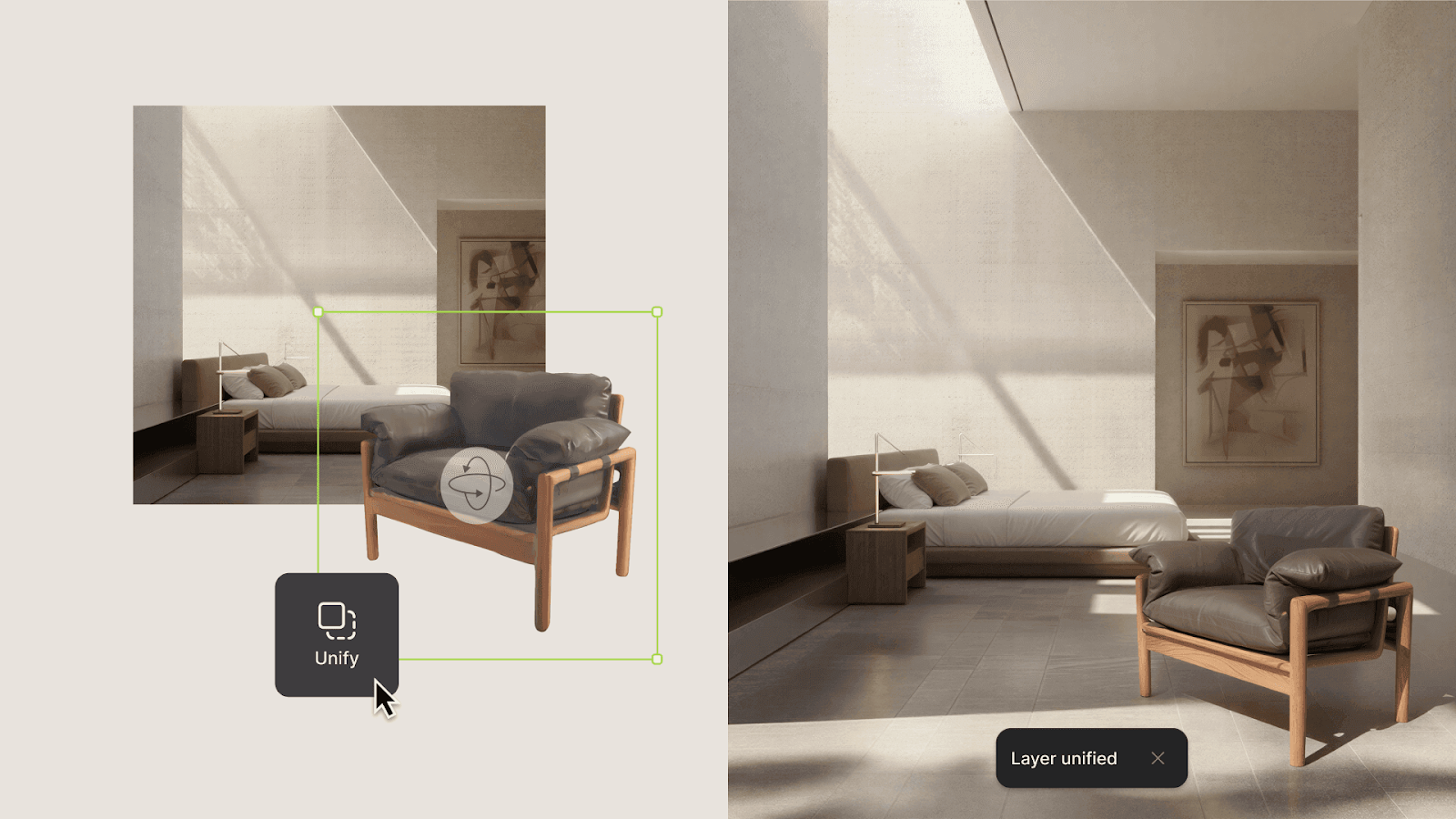
Vizcom Unify composites your design into environment backgrounds with matched lighting and shadows. Drop a concept into a retail shelf, kitchen counter, or workspace to show engineering how the product should read at actual scale. When stakeholders ask, "Will it fit?" or "Does the size feel right?", you have documentation that answers visually.
Material Close-Ups
Overview renders establish the design. Detail renders communicate finish intent.
When your design depends on specific surface characteristics—how light catches a texture, how a material transitions at edges, how colors read under different lighting—capture those details explicitly. Engineering and QC teams need visual references to verify against, not just text descriptions.
Consistency Across Components
Products with multiple parts need consistent visual documentation. When your BOM includes components that share finishes, engineering needs to see that consistency reflected in your handoff materials.
Custom Palettes ensure every component renders with identical treatments. Your handoff package shows the same surface finish across all parts that should match, eliminating ambiguity about which components share specifications.
Communicating What's Critical vs. Flexible
Not every design decision carries equal weight. Engineering needs to know where precision matters and where they have room to optimize for manufacturing.
Critical Design Features
Identify the decisions that define your design:
- Proportions that establish the form language
- Material choices that create the intended user experience
- Surface treatments that communicate brand or quality
- Relationships between elements that must be preserved
Be explicit. "The 8mm edge radius is critical to the soft form language" gives engineering different guidance than leaving them to interpret whether that radius matters.
Areas of Flexibility
Equally important: identify where engineering can optimize without compromising your intent.
Manufacturing often requires adjustments in draft angles, parting lines, and material substitutions. When you've already identified flexible areas, engineering can solve production problems without guessing which changes you'd accept.
Annotation and Callouts
Add notes directly to your visual documentation. Call out critical features, explain material rationale, and flag areas where you tested alternatives. These annotations travel with the files and remain visible when engineering reviews your work.
Building Handoff Into Your Workflow
The designers who hand off successfully don't create documentation as an afterthought. They capture decisions throughout development.
Save Key Iterations
Don't just save final files. Preserve the iteration stages that show how you got there. Major decision points, material explorations, proportional studies. This history answers questions that engineering will have about why the design resolved the way it did.
Create Visual Libraries
Build reference libraries of material studies, finish options, and detail views. When engineering asks, "What exactly did you mean by soft-touch matte?" you have visual documentation to point to.
Document Rationale in Real Time
It takes 30 seconds to note why you made a decision when you make it. Reconstructing that rationale weeks later for handoff takes much longer, if you can reconstruct it at all.
Intent That Survives Translation
Design handoff fails when intent stays implicit. It succeeds when your documentation makes the "why" visible alongside the "what."
The prototype that matches your vision comes from handoff materials that show engineering the decisions that shaped it, the alternatives you rejected, and the details that matter most on top of the final design.
Documentation created during development, like material studies, iteration history, and annotated views, answers questions before engineering has to ask them.
Preparing design work for engineering handoff? Try Vizcom to see how Render, 3D, Unify, and Custom Palettes create visual documentation that communicates your intent clearly.
Explore
Explore more blog posts & resources to get inspired
.webp)
Hatch Duo is a design studio based in San Jose built around a simple premise: great products hatch when two forces meet, your insight and their execution. Hatch's focus sits squarely in consumer packaged goods. For their latest collaboration with Vizcom, industrial designer Alec Comido wanted to see what he could design in one hour.

Explore color and material variations part-by-part without leaving Vizcom.


Frequently asked questions
Yes of course! Our starter plan is completely free, no credit card required. This is a great plan to explore vizcom with.
We accept all major credit and debit cards.
Admins (paid) – can edit files, manage workspace settings, billing, teams, and invite members. Editors (paid) – can edit files but not manage settings, billing, or teams. Viewers (free) – can only view files in read-only mode.
Team billing is handled centrally by the Admin. All paid seats, whether Admins or Editors, are included in a single invoice under the same billing cycle, while Viewers remain free and do not affect the cost.
Yes, you can. An Admin can update the plan in the billing settings, and the switch will take effect on the next billing cycle at the annual rate.
Yes, you own everything you create in Vizcom. For free users, while Vizcom may use generated images to improve its services, it does not claim ownership of your designs, concepts, or original ideas—you keep full rights to them. For paid users, your images and designs remain entirely private and are only used to deliver the service. Every design, concept, and image you create or upload is fully yours and kept confidential.
Vizcom does not use your data to train AI models if you’re on a paid plan. Everything you create stays private and is only used to provide the service. Free users may have their generated images included to help improve Vizcom’s services, but even then, Vizcom does not claim ownership of your designs, concepts, or original ideas—you retain full rights.