Remote Design Collaboration: What Physical Product Teams Need to Know
Learn how distributed physical product design teams collaborate effectively with the right tools and techniques.

You sketch a form, realize the proportions are off, and want to push it further. But your teammate who needs to evaluate the material finish is three time zones away, and the prototype sitting on your desk can't be in two places at once.
Physical product design has always required hands-on work. Pushing clay, assessing how light hits a surface, feeling whether a grip radius actually works. Remote collaboration doesn't change those requirements. It just means finding ways to work around them.
The teams that make distributed work successful have developed approaches that address these constraints while still moving faster than traditional studio setups allowed. They're shipping better work, retaining designers who'd otherwise leave for more flexible arrangements, and reclaiming hours that used to disappear into commutes.
What Is Remote Collaboration in Physical Product Design?
Remote collaboration in physical product design means adapting distributed work practices to objects you can't simply share through a screen. You're designing things that exist in three dimensions, require material evaluation, and depend on physical prototyping. That creates challenges software teams don't face.
The teams making this work rely on three components:
- Distributable development platforms that get working prototypes into remote team members' hands
- Cloud-native CAD platforms that let multiple people edit the same file simultaneously
- Structured communication protocols designed specifically for the spatial and visual nature of physical product work
For example, teams can use tools like Workbench to collaborate on an infinite canvas in real-time, creating multiple drawings, presenting concepts, and annotating design decisions without losing important details during the process.
Research involving 20 designers found that physical product design is possible while working from home, though certain activities remain more challenging than others. Early concept exploration, CAD development, documentation work, and research synthesis all work effectively in distributed settings.
Physical co-location adds more value for initial creative brainstorming, complex problem-solving requiring rapid iteration, material evaluation, and physical prototype assessment.
Why Remote Collaboration Benefits Physical Product Design Teams
Distributed teams ship better work faster when they structure remote collaboration around the specific needs of physical product design. Hybrid schedules maintain productivity while reducing attrition, and the time reclaimed from commuting goes directly into evaluating design directions and iterating on concepts.
Productivity Gains Without Sacrificing Quality
Hybrid work maintains productivity while reducing attrition. The most successful physical product design teams use two to three days remote because they recognize certain activities benefit from physical proximity while others work fine distributed. Employees on hybrid schedules are just as productive and far less likely to quit compared to fully office-based peers.
In fact, home-based workers show 13% higher productivity, meaning distributed teams can reclaim hours each week for actual design work. You get time back for evaluating design directions without commuting to a studio.
Business Impact
Remote work now accounts for 25% of paid workdays in the United States, a fivefold increase from the pre-pandemic 5%. Companies offering hybrid arrangements also gain an edge in attracting and retaining talent, particularly among designers who value flexibility.
Successful innovation requires strategic balance between remote and in-person work modes. You want to schedule in-person time intentionally for generative phases like initial brainstorming and concept development, while using distributed work for focused execution tasks like CAD development and documentation.
Faster Iteration Cycles
Tools that speed up the sketch-to-render workflow give distributed teams an even bigger advantage. When you're evaluating design directions remotely, rendering speed becomes critical. Render turns sketches into photorealistic output in seconds rather than hours, letting you specify materials like brushed aluminum or glossy Acrylonitrile Butadiene Styrene (ABS) and lighting conditions like soft studio light or dramatic side lighting. You can explore more directions without missing deadlines, even when your team isn't in the same room.
Remote Collaboration Best Practices for Physical Design Teams
Build distributable test platforms, use cloud-native CAD tools, and structure communication protocols explicitly. Coordinating around objects requiring hands-on evaluation presents unique challenges. Materials need assessment under specific lighting conditions, three-dimensional forms demand spatial understanding, and prototypes can't be instantly duplicated across distributed locations.
Solve the Physical Prototype Problem Intentionally
Physical prototypes need to reach remote team members' hands, which means building distributable test platforms rather than shipping one-off samples. The approach centers on building development boards or mock-ups representing core design elements, then distributing identical hardware to remote team members for hands-on testing.
If critical team members work remotely, building distributable test platforms that represent core design elements works better than shipping one-off prototypes and hoping for effective collaboration.
Use Tools Built for Real-Time Collaboration
Workbench lets multiple team members work simultaneously on an infinite canvas, creating drawings, presenting concepts, and annotating design decisions in real-time. No emailing files back and forth, no version conflicts, no waiting for someone to finish before you can contribute.
When your team works across time zones, speed matters. Render a concept in your location while teammates in another region review options as soon as they start their day. You can leave annotations directly on the canvas explaining your thinking, so the conversation continues even when you're not online at the same time.
Structure Communication Instead of Hoping It Happens
Distributed design teams often struggle with receiving timely feedback, replicating informal hallway conversations, and maintaining spontaneous collaboration moments. Successful distributed teams establish clear protocols distinguishing synchronous and asynchronous work.
Reserve synchronous sessions for the work that genuinely needs it: initial creative exploration, complex problem-solving that requires rapid back-and-forth, and stakeholder presentations where someone might need immediate clarification. Use asynchronous channels for detailed technical feedback, manufacturing feasibility reviews, material selections, and documentation updates. Explicitly communicate which mode you're using and expected response timeframes so everyone on distributed teams stays clear about expectations.
Document With Physical Context in Mind
Documentation for distributed teams needs to work harder to capture qualities that flat screens struggle to convey: material qualities, surface textures, color accuracy, and physical scale.
Combine multiple artifact types: hand sketches showing initial thinking, 3D renders from multiple angles revealing form relationships, photographs of physical prototypes with scale references, and video walkarounds demonstrating proportion and surface transitions. Use standardized templates documenting design intent, rationale, and constraints alongside visual artifacts. Use high-quality photography and videography to accurately capture material qualities and physical scale.
Presenting physical work remotely requires specialized critique systems. Establish standardized protocols for capturing multiple camera angles and consistent lighting conditions so reviewers can accurately evaluate surface quality, color accuracy, and material characteristics, whether you're assessing textured polycarbonate housings, anodized aluminum frames, or soft-touch plastic grips.
Render helps your distributed team evaluate material directions without physical samples when you're documenting early concepts for remote review.
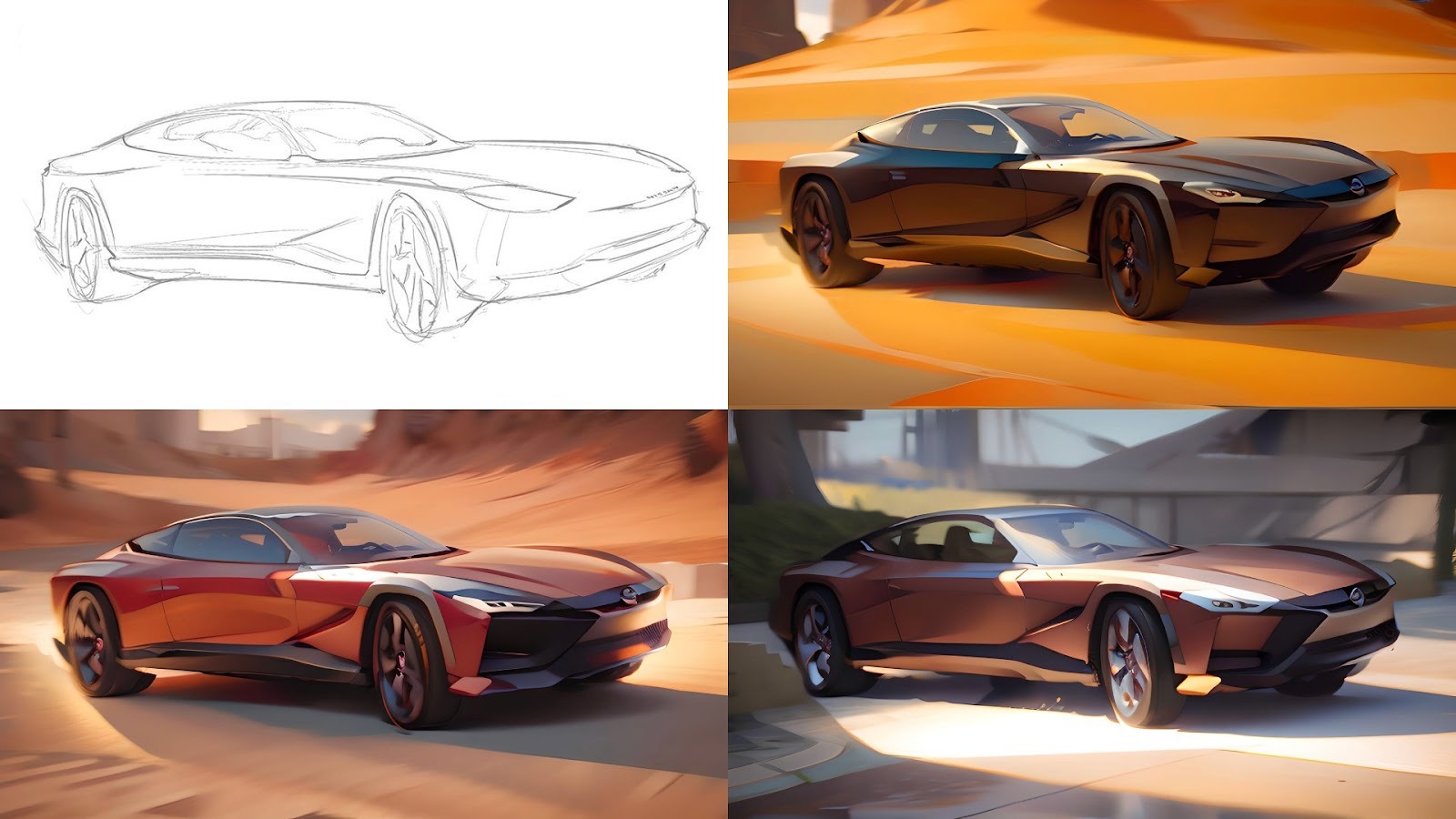
Specify materials and studio lighting to generate photorealistic options in seconds, letting distributed teams assess whether that brushed aluminum finish or matte titanium surface works for the design without waiting for everyone to gather around a physical mock-up.
Create Space for Private Iteration
You need room to experiment before exposing early concepts to review, particularly in remote contexts where file access feels ubiquitous. Sketch initial concepts in a private workspace, a protected area where you can iterate before sharing them with your team. This matters when you can't just close your sketchbook at your desk.
Structure your tools and workflows to explicitly separate private exploration from shared team work.
Balance Real-Time and Asynchronous Review
Early-stage concept development can benefit from real-time collaboration when multiple designers work together in 3D environments. Design teams addressing challenges around remote collaboration find that 3D collaboration early in the pipeline opens up an entirely new way of working. Presenting early-stage concepts in navigable 3D directly to wider stakeholder groups delivers clear understanding of the product development direction from the onset while saving teams time in reduced need for renders or refined 2D sketches.
Pre-share design artifacts 24 to 48 hours before scheduled reviews to allow adequate examination time. Assign specific roles for review sessions: presenter, facilitator who keeps discussion on track, timekeeper managing the agenda, and note-taker documenting decisions. Record sessions with clear topic indexing for team members in different time zones.
Building Remote Workflows for Physical Product Constraints
Physical product design teams that work effectively across distributed locations adopt specialized tools and intentional processes. Custom Palettes trains AI on your brand's specific color palette, material finishes, and form proportions. Remote designers then generate renders that automatically reflect those aesthetic standards without constant art direction calls or in-person coordination sessions. Workbench gives your team a shared infinite canvas where everyone can sketch, annotate, and present concepts in real-time, keeping design decisions visible and documented as the project evolves.
Speed up the parts that can happen asynchronously and coordinate intentionally around the parts that need synchronous collaboration. Try Vizcom free or book a demo to see how faster rendering and real-time collaboration can work for your distributed team.
Explore
Explore more blog posts & resources to get inspired
.webp)
Hatch Duo is a design studio based in San Jose built around a simple premise: great products hatch when two forces meet, your insight and their execution. Hatch's focus sits squarely in consumer packaged goods. For their latest collaboration with Vizcom, industrial designer Alec Comido wanted to see what he could design in one hour.

Explore color and material variations part-by-part without leaving Vizcom.


Frequently asked questions
Yes of course! Our starter plan is completely free, no credit card required. This is a great plan to explore vizcom with.
We accept all major credit and debit cards.
Admins (paid) – can edit files, manage workspace settings, billing, teams, and invite members. Editors (paid) – can edit files but not manage settings, billing, or teams. Viewers (free) – can only view files in read-only mode.
Team billing is handled centrally by the Admin. All paid seats, whether Admins or Editors, are included in a single invoice under the same billing cycle, while Viewers remain free and do not affect the cost.
Yes, you can. An Admin can update the plan in the billing settings, and the switch will take effect on the next billing cycle at the annual rate.
Yes, you own everything you create in Vizcom. For free users, while Vizcom may use generated images to improve its services, it does not claim ownership of your designs, concepts, or original ideas—you keep full rights to them. For paid users, your images and designs remain entirely private and are only used to deliver the service. Every design, concept, and image you create or upload is fully yours and kept confidential.
Vizcom does not use your data to train AI models if you’re on a paid plan. Everything you create stays private and is only used to provide the service. Free users may have their generated images included to help improve Vizcom’s services, but even then, Vizcom does not claim ownership of your designs, concepts, or original ideas—you retain full rights.