
Kohler's Secret to Faster Design Presentations
See how Kohler's industrial design team uses Vizcom to save time, speed up workflows, and create better work.

When Connor McManus, Senior Industrial Designer at Kohler, first started using Vizcom, he thought of it as a sketch-to-render tool.
It didn't take long for him to realize it was something much more powerful than that. That shift in thinking from visualization tool to design thinking tool is at the heart of how Kohler has quietly built one of the most mature AI-assisted design workflows in the industry.
It didn't start with Vizcom
About two years ago, Kohler's industrial design team ran an internal experiment. They took on a full project for Kohler's chocolates business (yes, Kohler makes chocolates) and used Midjourney, ChatGPT, and Perplexity from research and personas all the way through to final assets.
The experiment was eye-opening, but the tools didn't fully stick, which is when they found Vizcom.
A few designers started experimenting, and it clicked almost immediately,adoption taking off entirely on its own.
The numbers tell the story
Today, Kohler has over 50 designers spanning multiple product categories collaborating in Vizcom.

But the stat that stands out most is a simpler one. Before Vizcom, Connor estimates that roughly 50% of his time was spent producing imagery for PowerPoints and posters.
With Vizcom integrated into his workflow, that's down to 20%. That's not a marginal efficiency gain, it's a fundamental reallocation of a designer's time toward the work that actually requires a great designer.
What the workflow actually looks like
Connor uses Vizcom across the full design process, but a few specific workflows have become particularly valuable for his team.
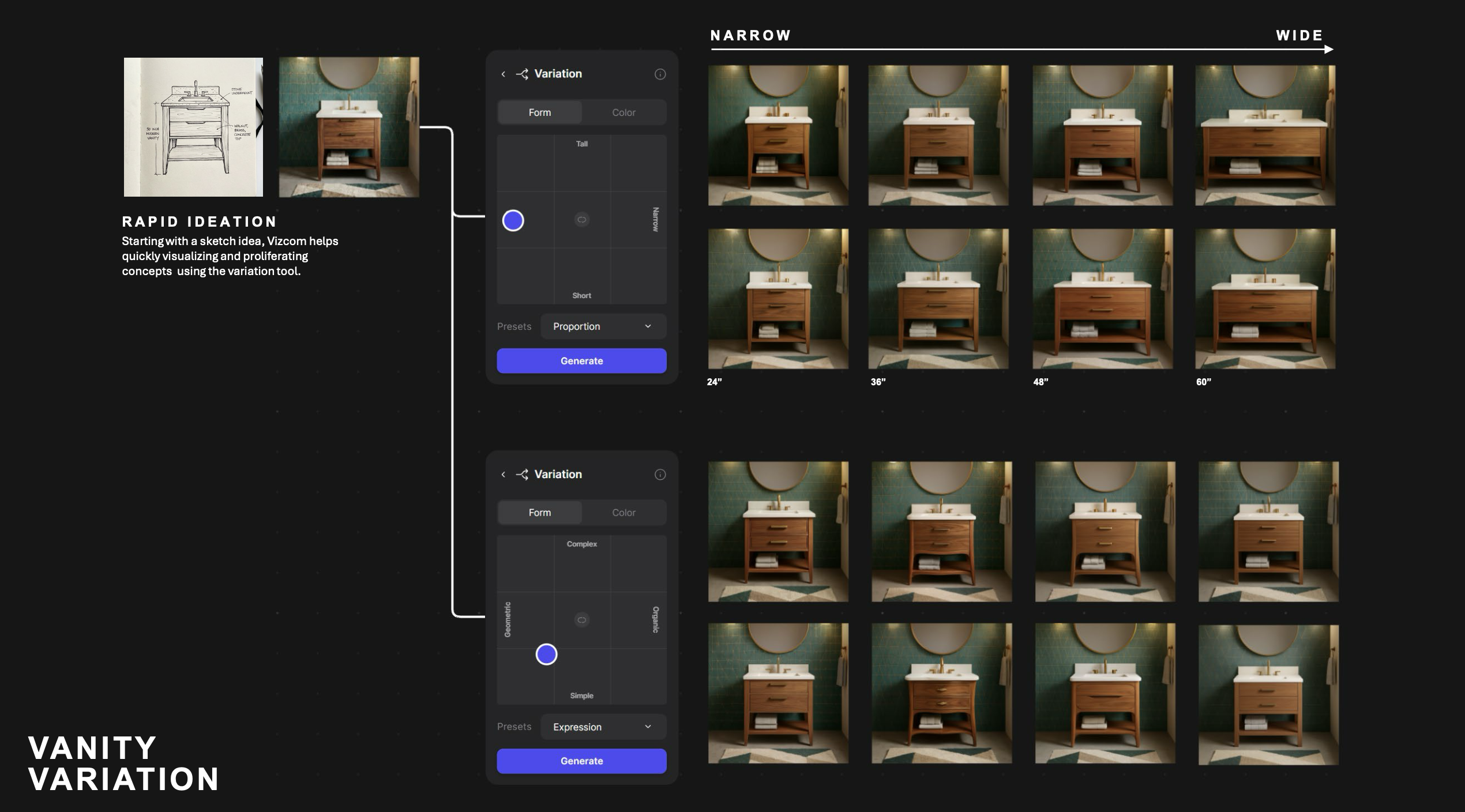
Rapid ideation
When Connor has a specific vision, he adds or changes one element at a time (environment, materials, lighting, props) working through five to twenty prompts or more until he gets exactly what he wants. It takes longer, but gives him precise control over every element in the image.
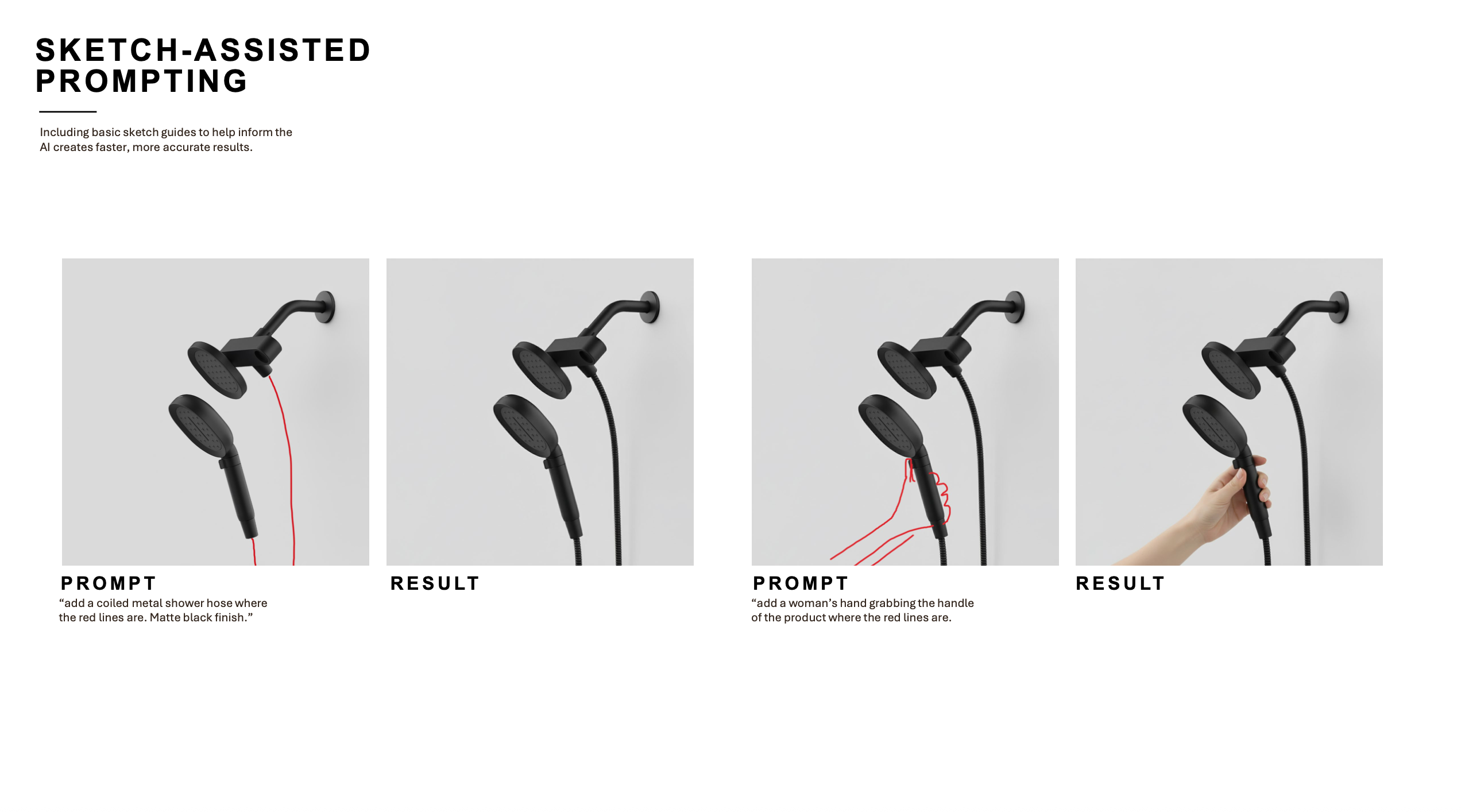
Sketch assisted prompting
For showering products especially, Connor uses rough sketches with simple annotations to help Vizcom understand scale. A low-fidelity hand sketch layered onto an image communicates what a text prompt sometimes can't.
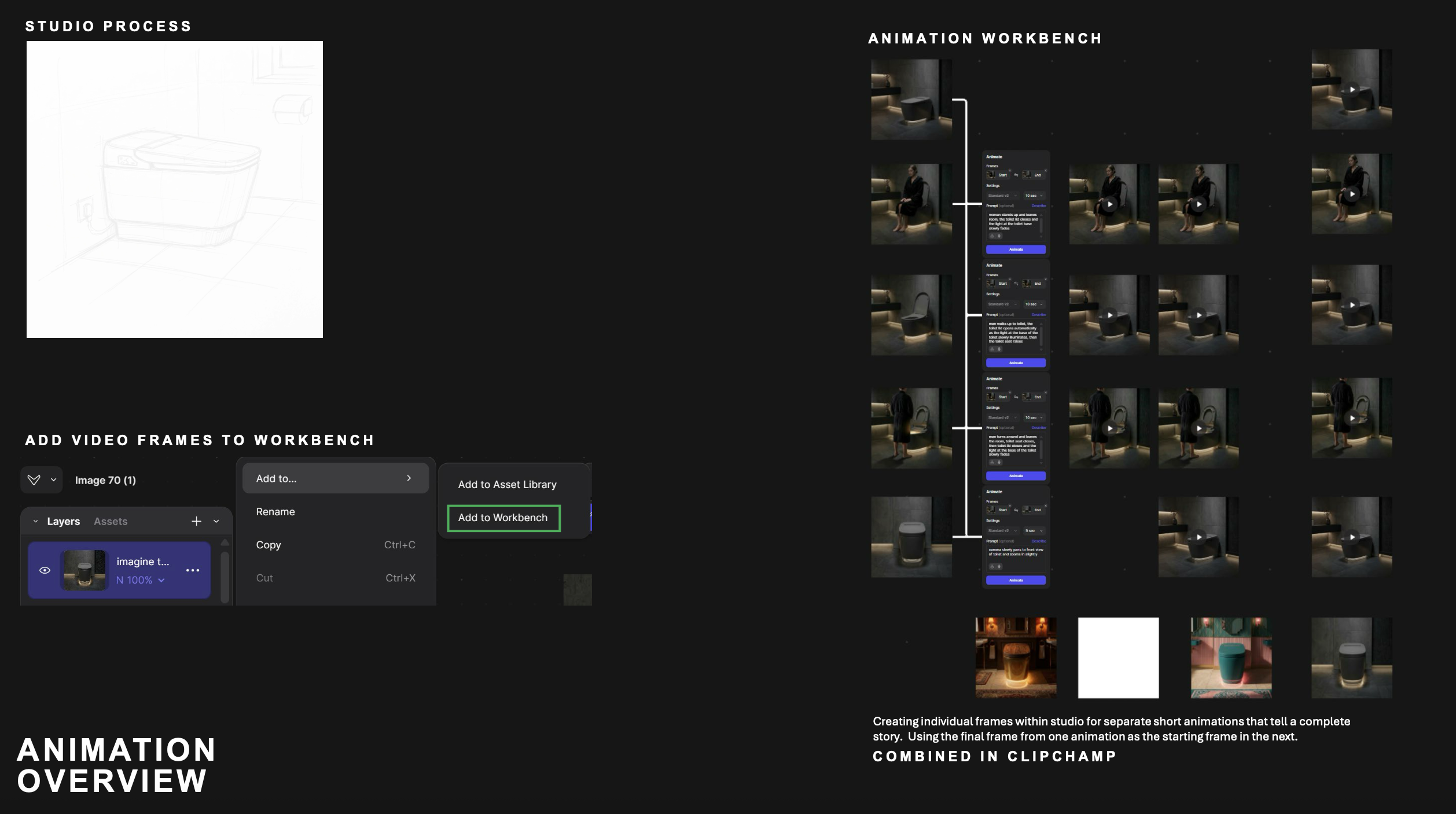
Animation
Most Kohler presentations happen virtually or in spaces without running water, making it difficult to convey what a shower product actually does. Previously, that kind of animation work was outsourced to consultancies at significant cost.
The mindset shift nobody talks about
The efficiency gains are real and measurable. But Connor points to something less tangible and arguably more important when he talks about what Vizcom has actually changed for his role day to day.
When Vizcom can produce dozens of high-quality options in minutes, the bottleneck is no longer output, it's judgement.
Connor has developed his own system for navigating that. When reviewing a batch of generated images, he adds his favorites to a layer stack and eliminates them one at a time "like I'm at the eye doctor, better one or better two" until he has a clear winner.
The process forces him to articulate why he prefers one direction over another, which makes him a sharper advocate in presentations.
Leadership's view: Augmented, not automated
The push toward AI-assisted workflows at Kohler has been driven in part by Michael Seum, VP of Industrial Design, who has framed the shift from the beginning as "augmented" design, keeping the human at the center.
"The role of design isn't being replaced, but it is being redefined." - Michael Sieum
In his view, cultural awareness, regional design strategy, and brand integrity are traits that will always remain human. What AI tools like Vizcom enable is speed, pattern recognition, and automation of the more rote parts of the workflow freeing designers to spend more time on the things that actually require human judgment.
What's next for Kohler
The team is working on better shared file management, building out dedicated Vizcom project files and adding the right designers to each. Other teams at Kohler are experimenting with style palettes trained on specific product lines to maintain brand consistency while generating new concepts.
And Connor is the first to admit there's still more to explore, including CAD export features that could eventually deepen the handoff between design and engineering.
For now, the clearest signal of where things are headed came from the designers themselves, when they started saying they didn't want to go back to Keyshot.
Hear from Kohler
Watch the full webinar and see exactly how they built one of the most mature AI-assisted design workflows in the industry.
Explore
Explore more blog posts & resources to get inspired

430 submissions. 30 finalists. 3 designs headed off to be printed. Here's how a global community of designers reimagined the mule.

Kai Bettermann took the oldest clock there is, built the sun into it, and found out with a ring light before he found out with a render.
.jpg)
-cover.jpg)
Frequently asked questions
Yes of course! Our starter plan is completely free, no credit card required. This is a great plan to explore vizcom with.
We accept all major credit and debit cards.
Admins (paid) – can edit files, manage workspace settings, billing, teams, and invite members. Editors (paid) – can edit files but not manage settings, billing, or teams. Viewers (free) – can only view files in read-only mode.
Team billing is handled centrally by the Admin. All paid seats, whether Admins or Editors, are included in a single invoice under the same billing cycle, while Viewers remain free and do not affect the cost.
Yes, you can. An Admin can update the plan in the billing settings, and the switch will take effect on the next billing cycle at the annual rate.
Yes, you own everything you create in Vizcom. For free users, while Vizcom may use generated images to improve its services, it does not claim ownership of your designs, concepts, or original ideas—you keep full rights to them. For paid users, your images and designs remain entirely private and are only used to deliver the service. Every design, concept, and image you create or upload is fully yours and kept confidential.
Vizcom does not use your data to train AI models if you’re on a paid plan. Everything you create stays private and is only used to provide the service. Free users may have their generated images included to help improve Vizcom’s services, but even then, Vizcom does not claim ownership of your designs, concepts, or original ideas—you retain full rights.