
Automotive Design Education: What Schools Actually Look For
Prepare your automotive design portfolio for top programs. Skills, projects, and processes that get in.

Top automotive design programs accept a fraction of applicants. At the most competitive schools, multiple candidates compete for every spot.
What separates the applicants who get in from those who don't?
Admission committees look for observational drawing mastery, original transportation design projects demonstrating your thinking process, and digital fluency alongside traditional sketching. Students who understand these priorities and prepare accordingly have a clear path forward.
This guide covers the specific skills and portfolio strategies that improve your admission chances. Foundational drawing requirements, digital tool expectations, project types that stand out, and how to document the process effectively.
Foundational Drawing Skills Schools Expect
Observational drawing ability determines admission success more than any other factor. Most aspiring designers miss this, focusing on refined final renderings and software mastery instead.
Observational Drawing Requirements
Drawing from life means sketching real objects directly in front of you: actual chairs, bicycles, coffee makers. This trains your eye to understand form, proportion, and component relationships. These are the same skills that make car designs feel right.
Perspective and Form Development
Strong fundamental sketching demonstrates confidence through line quality and form development. Build mastery across multiple angles, proper proportion, accurate wheel placement, and convincing surface development.
Study production vehicle proportions extensively. Proper wheel sizing and package requirements should inform every vehicle concept you develop.
Why Schools Prioritize Hand Skills
Automotive design studios rely on rapid hand sketching for ideation and communication. CAD handles refinement and engineering coordination, but the initial concept communication happens on paper or tablet.
Schools can teach you professional software. They can't teach you to see like a designer. Your portfolio needs to prove you already have that foundation.
Digital Tool Proficiency Requirements
Admission committees prioritize creative thinking and foundational drawing over software proficiency. But digital fluency increasingly matters for portfolio presentation and demonstrating contemporary workflow understanding.
What Schools Actually Require vs. Prefer
Programs like Art Center, CCS, and OCAD teach professional CAD tools (Alias, Rhino, SolidWorks) as curriculum outcomes, not admission prerequisites. You don't need CAD expertise to get in.
What helps: basic digital literacy for portfolio presentation, familiarity with digital sketching tools, and the ability to show your work in polished formats.
Digital Sketching for Portfolio Development
Digital tools help you demonstrate iteration depth without needing full CAD expertise yet.
The Render feature turns your hand sketches into presentation-quality visuals. Your linework defines the form; Render applies materials and lighting. This shows admissions committees both traditional sketching skill and digital fluency in one piece, which is exactly the combination contemporary programs want to see.
You can present polished concept variations without spending weeks learning professional rendering software. The hand-sketching foundation (what schools actually evaluate) stays central while the digital output demonstrates you understand modern workflows.
The Hand-to-Digital Balance
Contemporary automotive design combines hand sketching for creative ideation with digital tools for execution. Your portfolio should reflect this balance: strong traditional foundations with enough digital fluency to present work professionally.
Master hand sketching first. Add digital presentation capability on top. Don't substitute one for the other.
Portfolio Project Types That Stand Out
Original transportation designs that solve real mobility challenges demonstrate how you think about design problems. Schools evaluate your ability to identify problems, develop solutions through iteration, and communicate your thinking clearly.
Project Variety
Art Center's Transportation Design program covers automotive, motorcycle, marine, aircraft, and personal mobility. A portfolio with passenger car concepts, a motorcycle, and a personal mobility device shows more range than five variations on sports car themes.
Aim for 5-8 substantial projects showing variety in scope and complexity:
- 3-5 original vehicle or transportation designs
- Interior or user experience work
- Conceptual future mobility thinking
- Detail-focused studies on form, proportion, or surface quality
Passion Projects vs. Redesigns
Projects should demonstrate passion for and curiosity about transportation's future. Art Center specifies that projects "can include cars," signaling they want breadth in how you approach transportation problems.
Include projects that reflect your genuine interests. Schools recognize authentic enthusiasm versus projects created solely to fill portfolio requirements.
Showing Iteration Depth
When admissions committees ask for process documentation showing multiple design directions, you need to demonstrate thinking breadth.
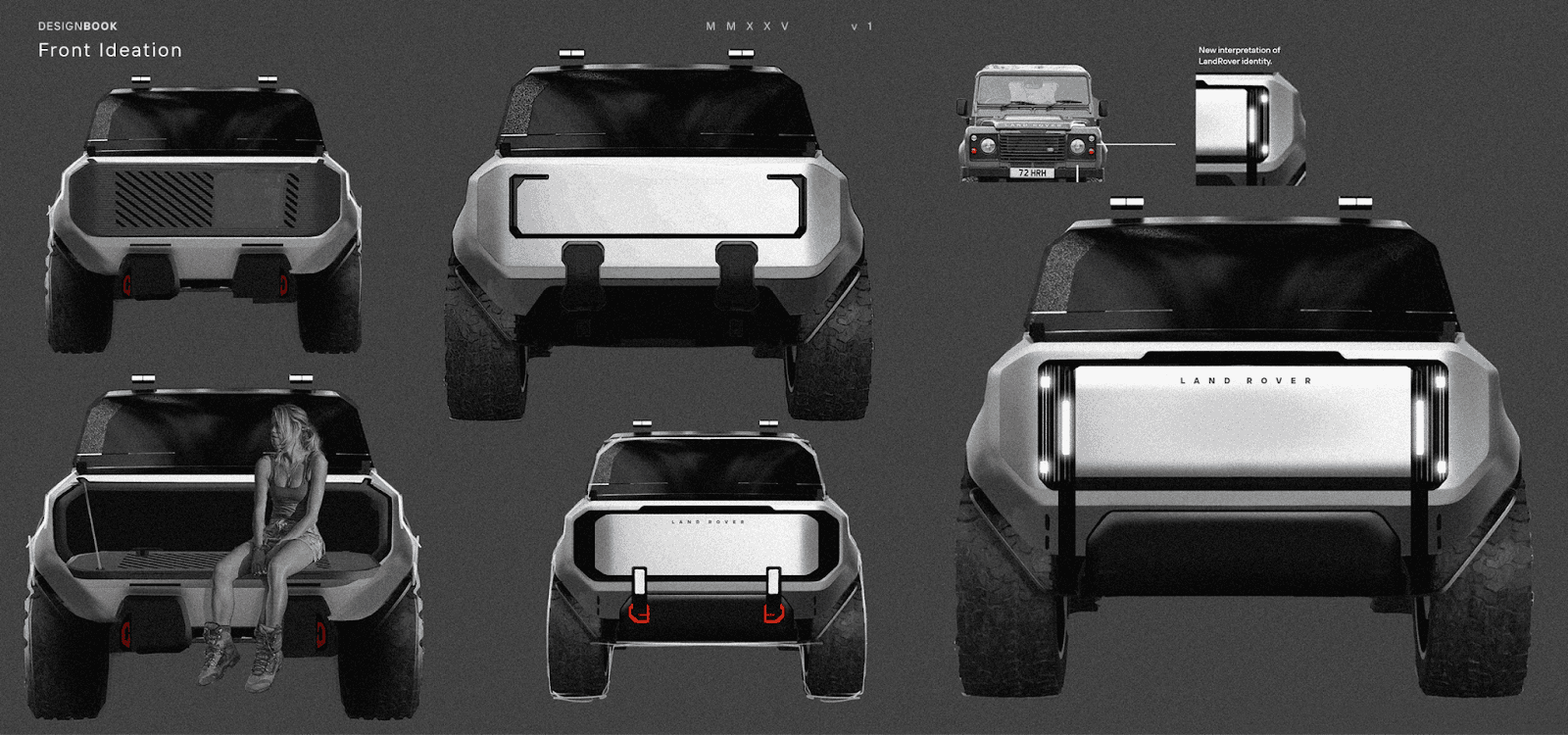
Vizcom Render lets you present 20-30 concept variations instead of the handful you'd have time to fully render manually. Each variation shows a different direction you explored, a different proportion you tested, a different form of language you considered.
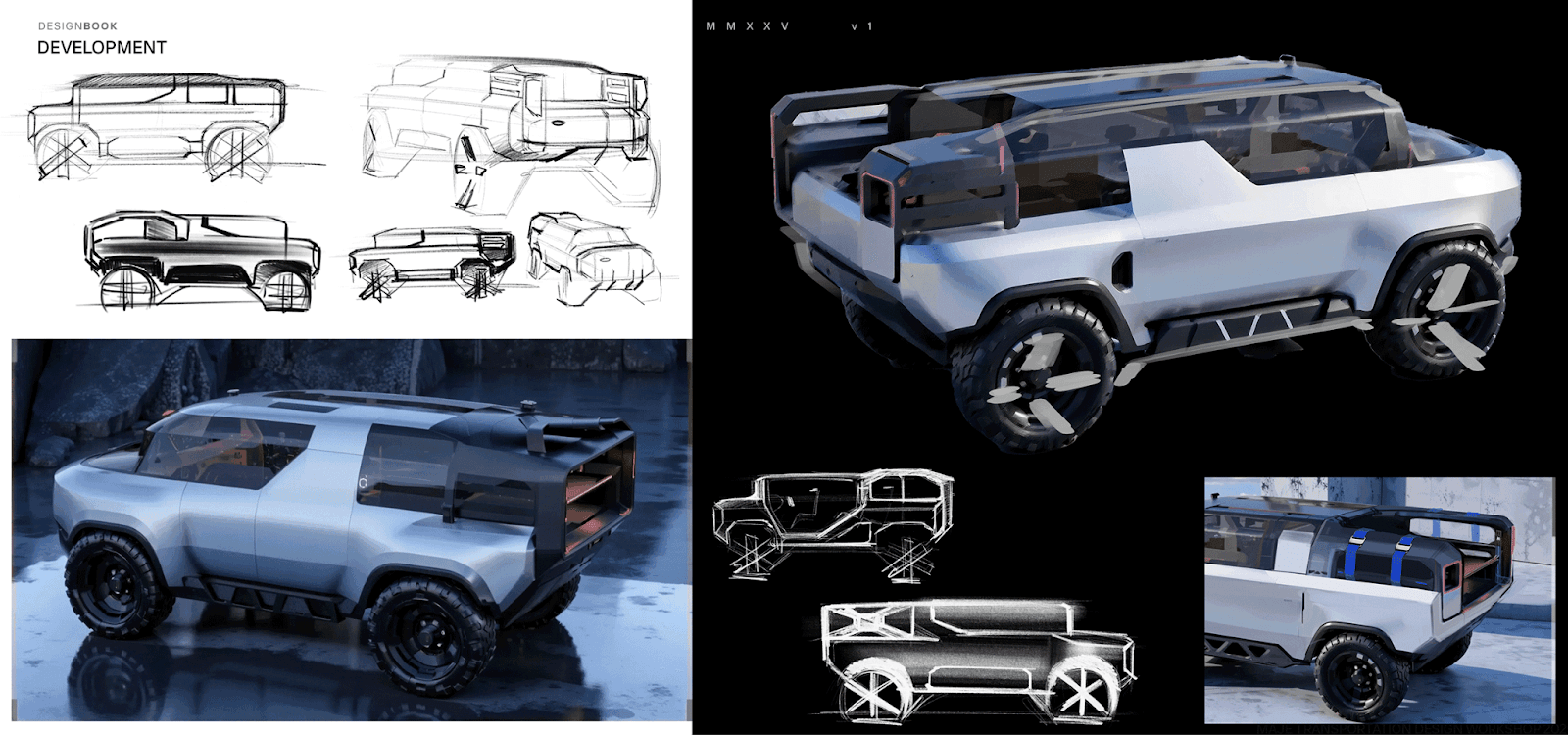
In the MAJE TD workshop, transportation design students used this approach under a compressed four-week timeline. Yebeen Kim explored variations on her triangular theme for a Chevrolet off-road concept, while Kunal Maniar iterated on forms and materials for his Land Rover Action Lab before committing to a final direction. Both walked away with portfolio pieces demonstrating the range of directions they considered.
Admissions committees see your iteration depth and design thinking range, not just final polish on a few hero shots.
Demonstrating Design Process Over Final Output
Art Center's requirements specify that applicants must submit "process examples such as mind-maps, personas/market research, or thumbnail sketches of different design directions" alongside final renderings. CCS similarly requires applicants to demonstrate the design process through original design ideas developed from conceptual stories.
Schools assess how you think and problem-solve, not just the aesthetic quality of final renderings.
What Process Documentation Includes
Show the work before the final render:
- Mind-maps and initial research
- Thumbnail sketches exploring different directions
- Iteration sequences showing how concepts evolved
- Decision rationale explaining why you chose specific directions
The "messy sketches" that show exploration, iterations, and reasoning behind design decisions separate portfolios that earn admission from those overlooked.
Sequential Presentation
Present each project from ideation sketches through concept refinement to final design. Let committees trace your thinking through each stage.
Three process stages leading to one final stage is a good ratio. Allocate the majority of portfolio pages to demonstrating design thinking through sketches, iterations, and decision rationale.
Using Digital Tools for Process Documentation
Vizcom Render also captures your exploration stages in presentation-quality format. When you test different proportions, surface treatments, or form directions, save those renders as process documentation.
Committees see that you explored alternatives, evaluated options, and made deliberate choices, not that you landed on your first idea and rendered it beautifully.
Building a Portfolio Timeline
Start portfolio preparation 12-18 months before application deadlines. Top programs expect you to immediately engage with sponsored projects from major manufacturers once admitted, which means your portfolio must demonstrate substantial prior skill development.
Development Phases
Months 1-6: Build observational drawing foundation. Aim for 20+ pieces based on Art Center's standard. Draw real objects, develop line confidence, master proportion and form.
Months 6-12: Develop original transportation design projects. Complete 3-5 substantial vehicle concepts with full process documentation for each.
Months 12-18: Refine, curate, and present. Review school-specific requirements carefully. Polish presentation quality.
Pre-CAD Concept Validation
Before investing months learning professional CAD systems, you can explore and validate concepts digitally.
Make 3D converts your sketches into rotatable models. Check that your proportions work from multiple angles, verify wheel placement and package relationships, and identify issues before including a piece in your portfolio. You get three-dimensional validation without the CAD learning curve that comes later in your education.
School-Specific Requirements
Review each target program's stated requirements directly. For example, Art Center requires 20-25 observational drawings. CCS requires a minimum of 10 pieces with at least five from direct observation. Some programs emphasize specific skill demonstrations like perspective and scale.
Generic portfolio advice gets you part of the way there. Meeting each program's stated requirements directly improves your chances substantially.
Common Portfolio Mistakes That Hurt Applications
Neglecting Observational Drawing
The most common mistake: focusing on vehicle renderings while neglecting the observational foundation that schools explicitly require. If Art Center wants 20-25 observational pieces, submitting 10 means your application is incomplete, regardless of how good your car designs are.
Skipping Process Documentation
A portfolio of only final renderings tells committees nothing about how you think. They can't evaluate your problem-solving methodology, your ability to iterate, or your design reasoning.
Document the middle stages like form development, proportion refinement, and detail resolution. Reviewers need to trace your process from initial sketch to final rendering.
Over-Relying on Digital Tools
Schools want to see hand sketching ability, particularly in ideation and development phases. Portfolios that substitute digital polish for foundational drawing skill get flagged.
Demonstrate strong traditional foundations first. Use digital tools to enhance presentation, not replace core skills.
Weak Presentation Quality
Clean, professional presentation demonstrates design competency before anyone evaluates your actual projects. Use consistent formatting, high image quality, and minimal text focused on essential project context.
Staffordshire University’s portfolio advice highlights the importance of carefully curated content, clear layout, and professional presentation, while other portfolio guides, such as UAL’s, stress that white space is a powerful presentation tool to let your work stand out.
Limited Project Variety
Five variations on sports car themes show narrow thinking. Include different transportation types, interior work, and conceptual studies. Schools want to see that you can tackle diverse design challenges with consistent quality.
Building Your Application Portfolio
Competitive programs evaluate two things: foundational design skills and design thinking capability. Schools teach software and rendering techniques. They can't teach you to see like a designer. Your portfolio proves you already have that foundation.
Focus on observational drawing mastery, original transportation projects with process documentation, and professional presentation. Plan for 12-18 months of dedicated work.
Students get a free Pro plan, including Render, Make 3D, and Custom Palettes. Sign up with your student email to build your portfolio.
Explore
Explore more blog posts & resources to get inspired
.webp)
Hatch Duo is a design studio based in San Jose built around a simple premise: great products hatch when two forces meet, your insight and their execution. Hatch's focus sits squarely in consumer packaged goods. For their latest collaboration with Vizcom, industrial designer Alec Comido wanted to see what he could design in one hour.

Explore color and material variations part-by-part without leaving Vizcom.


Frequently asked questions
Yes of course! Our starter plan is completely free, no credit card required. This is a great plan to explore vizcom with.
We accept all major credit and debit cards.
Admins (paid) – can edit files, manage workspace settings, billing, teams, and invite members. Editors (paid) – can edit files but not manage settings, billing, or teams. Viewers (free) – can only view files in read-only mode.
Team billing is handled centrally by the Admin. All paid seats, whether Admins or Editors, are included in a single invoice under the same billing cycle, while Viewers remain free and do not affect the cost.
Yes, you can. An Admin can update the plan in the billing settings, and the switch will take effect on the next billing cycle at the annual rate.
Yes, you own everything you create in Vizcom. For free users, while Vizcom may use generated images to improve its services, it does not claim ownership of your designs, concepts, or original ideas—you keep full rights to them. For paid users, your images and designs remain entirely private and are only used to deliver the service. Every design, concept, and image you create or upload is fully yours and kept confidential.
Vizcom does not use your data to train AI models if you’re on a paid plan. Everything you create stays private and is only used to provide the service. Free users may have their generated images included to help improve Vizcom’s services, but even then, Vizcom does not claim ownership of your designs, concepts, or original ideas—you retain full rights.