AI Design Workflow Integration: Where AI Fits Your Process
AI design workflow integration fits early iteration, not final polish. Learn where AI accelerates your process.

You're sketching dozens of concepts but only developing a fraction because rendering, revisions, and cross-referencing eat up your time. 83% of creative professionals already use AI tools, yet many remain skeptical about whether AI improves creative work or just speeds up mediocrity.
Teams that integrate AI at specific bottlenecks while maintaining creative control see performance improve by 66%, according to Nielsen Norman Group research. The gains concentrate in early-stage exploration, roughly the first 0-30% of a project, which means knowing where your time actually goes determines where AI fits.
What Is an AI Design Workflow?
A traditional product design workflow moves through a familiar sequence.
Research establishes direction, which informs concept sketching.
Those sketches evolve into renderings that let you evaluate materials and surface quality, then into prototypes that test ergonomics and manufacturing feasibility.
Feedback drives refinement until the design reaches production handoff.
An AI design workflow follows the same sequence but compresses specific stages by using AI tools to handle time-intensive tasks that don't require your creative judgment.
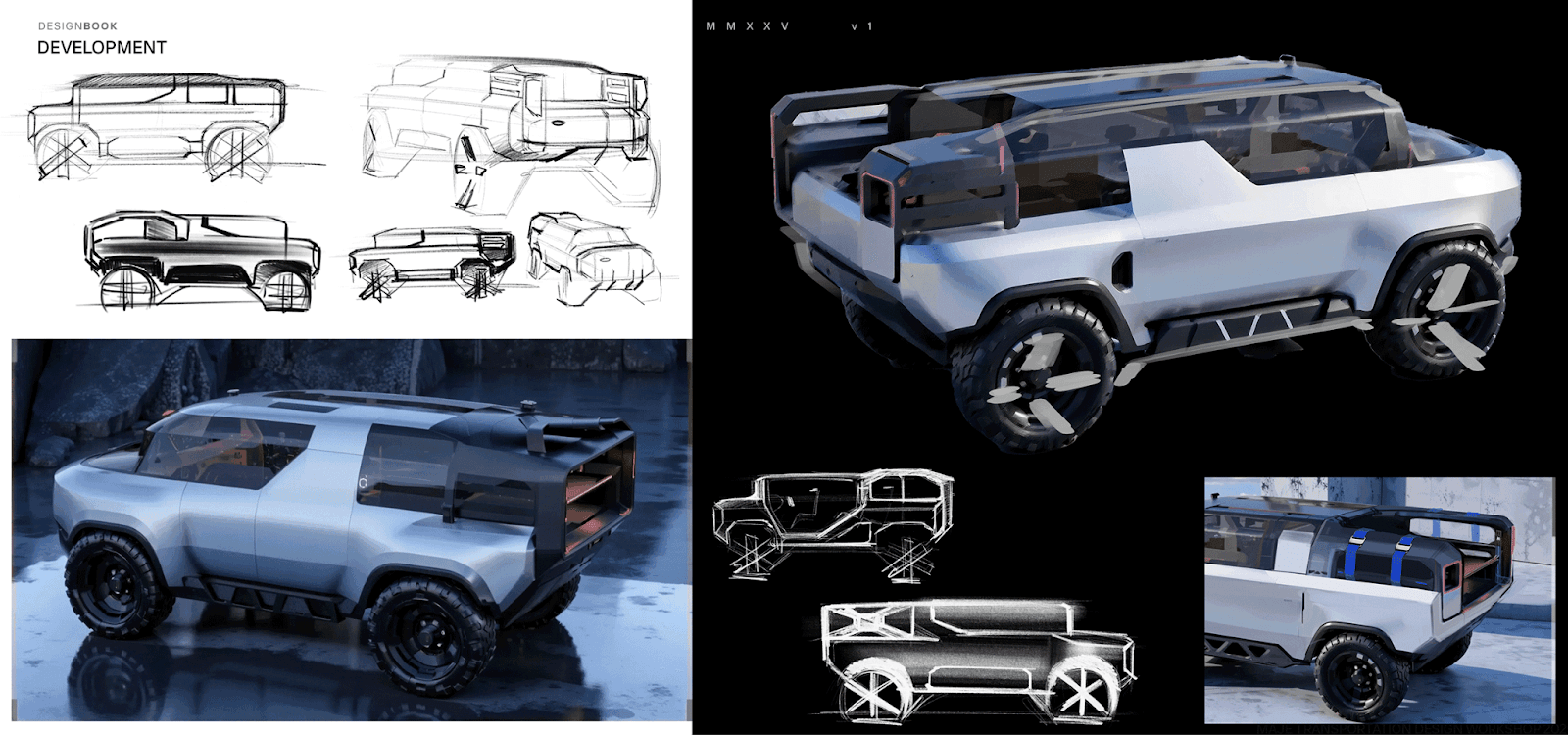
Instead of spending hours manually rendering each concept or waiting for 3D models to evaluate form in the round, you use AI to generate photorealistic renders from sketches, test material and lighting variations rapidly, or convert 2D renderings into textured 3D meshes.
The workflow itself doesn't change.
What changes is the speed at which you move through the visualization-heavy middle stages, where rendering has traditionally been the bottleneck.
Where Your Time Actually Goes
Prototyping and refinement consume more than half of the project time across industrial design, product design, and automotive projects.
Prototyping alone requires 3-8 weeks per iteration, depending on material complexity and manufacturing considerations. Testing and validation cycles stack on top of that.
Many designers regularly face client requests for revisions.
Each iteration requires complete re-rendering with traditional methods, a process that can take minutes or even hours per frame.
You're forced to commit to concepts based on incomplete information because you can't afford the time to visualize all the alternatives.
Where AI Actually Helps Your Work
Not every stage of your workflow benefits equally from AI. The value concentrates in specific phases, and knowing the boundary between AI territory and yours makes integration practical.
Early-Stage Exploration and Material Testing
AI adds genuine value during early-stage ideation and concept development, roughly the first third of a project.
Your expertise takes over during design refinement and final production readiness, where brand alignment, manufacturability, and creative specificity require your judgment.
Material exploration and initial concept development are the sweet spot.

When you're working through early concepts, trying different color and material directions, or generating variations to see what resonates, compressing rendering time changes what's possible.
You can explore broader territories before narrowing focus, instead of committing to one or two directions because you can only afford to visualize a limited set.
Vizcom Render turns sketches into photorealistic output with accurate material properties, surface textures, and realistic lighting.
Your sketch defines form and proportion; your prompt controls materials, surface finishes, and lighting setup.
You can test how a concept reads in brushed aluminum versus soft-touch plastic, or explore matte titanium against polished chrome, in seconds rather than hours.
All of this happens before you commit to detailed CAD work, when rapid visualization matters most.
A Wharton professor studying AI-augmented brainstorming found that it can improve ideation by generating expansive idea pools.
The recommended approach is to use AI to generate possibilities, then apply your design judgment to choose and refine the best ones. AI handles divergent thinking while you stay in control of convergent decisions.
What Stays in Your Hands
AI tools make it hard to produce exactly the picture you want, and that limitation preserves your agency.
You can't prompt your way to a finished design that meets brand standards, manufacturing constraints, and aesthetic goals. AI accelerates exploration without replacing the judgment that makes you valuable.
Specialized industrial design geometry, where training data is limited, still requires your expertise.
Creative direction requires an understanding of brand strategy and market positioning, which stays in your hands.
Mapping Your Workflow to Find Integration Points
The most successful AI integration starts with an honest assessment of your current process.
Frameworks like DesignOps, Google's Design Sprint, and ESOAR help you map processes and identify bottlenecks systematically.
Start by mapping your current workflow visually so everyone can see where time goes. Include realistic time estimates for each phase based on recent projects, and mark where delays consistently occur.
Then look at which delayed tasks share these characteristics:
- Repetitive across projects with little variation in how they're performed
- Data-intensive in ways that don't require creative judgment
- Time-consuming but low-value, where hours spent don't proportionally improve the output
- Prone to human error, especially in cross-referencing or version tracking
Those are your AI integration candidates.
The ESOAR framework provides systematic criteria:
- Eliminate unnecessary steps,
- Standardize processes,
- Optimize remaining work,
- Automate routine tasks, and
- Robotize with AI.
Evaluate each candidate against the early-stage exploration principle.
Does this task require creative judgment and refinement (leave it to you), or does it involve generating options and variations for evaluation (potential AI application)?
Tasks that fall into "generate and evaluate" patterns typically benefit from AI acceleration.
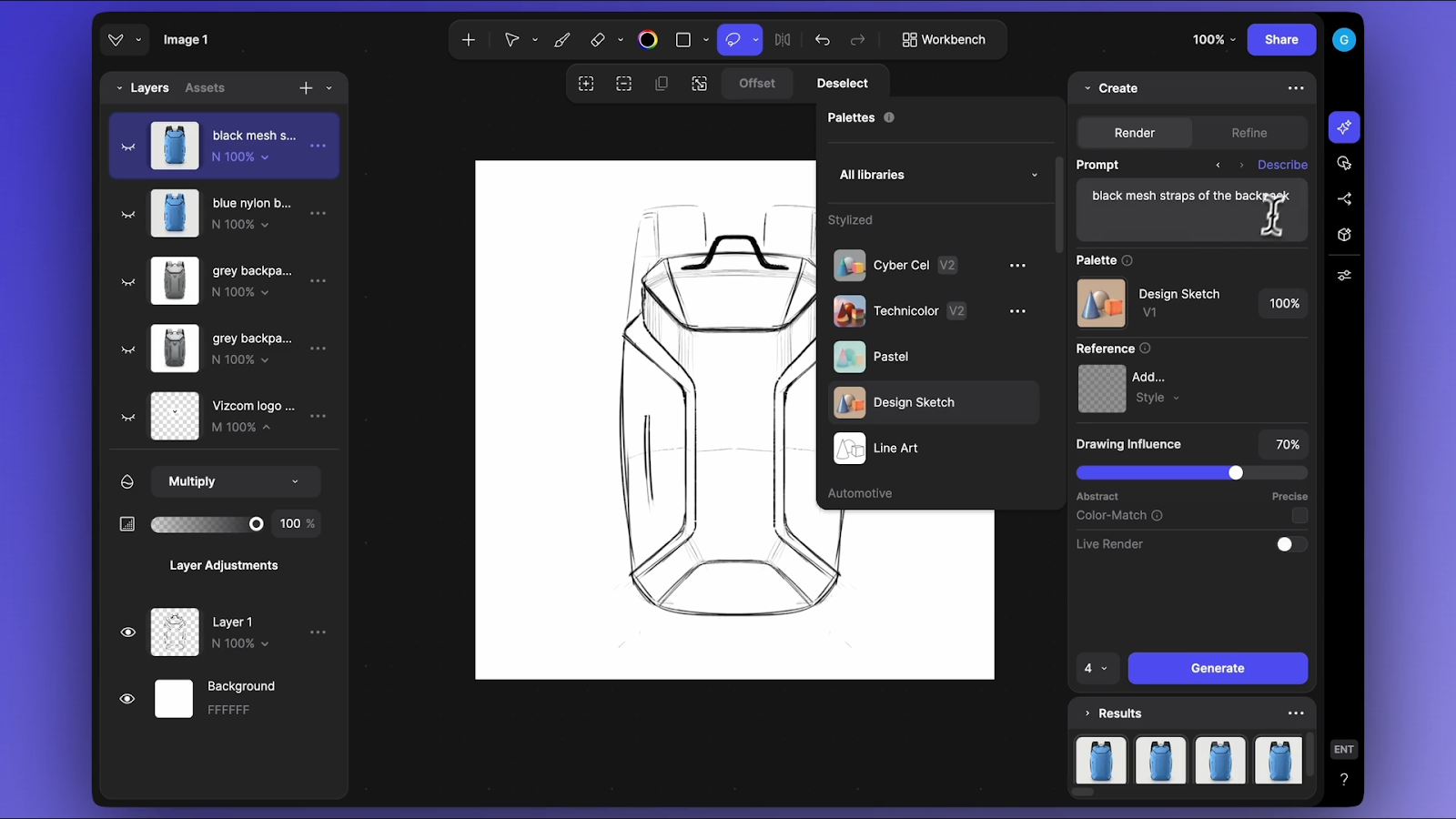
In this mapping process, Vizcom addresses bottlenecks in the 0-30% completion range.
Starting from a rough product sketch, you can quickly test how the form reads in brushed aluminum with soft studio lighting against a white background, then try matte black with dramatic side lighting to see which direction resonates before investing days in detailed CAD modeling.
Building Your Integration Strategy
Knowing where AI fits is one thing. Making it stick in your team's day-to-day process is another. Two principles separate teams that see lasting gains from those that abandon AI after a few experiments.
Start With One Bottleneck
Strategic AI integration improves performance by 40-66%.
Most organizations miss these gains by limiting AI to basic tasks like search and summarization.
The difference comes down to shallow adoption versus workflow integration. Full integration puts your team at the higher end of reported ranges rather than the industry average.
Start with one bottleneck rather than trying to overhaul your entire process at once.
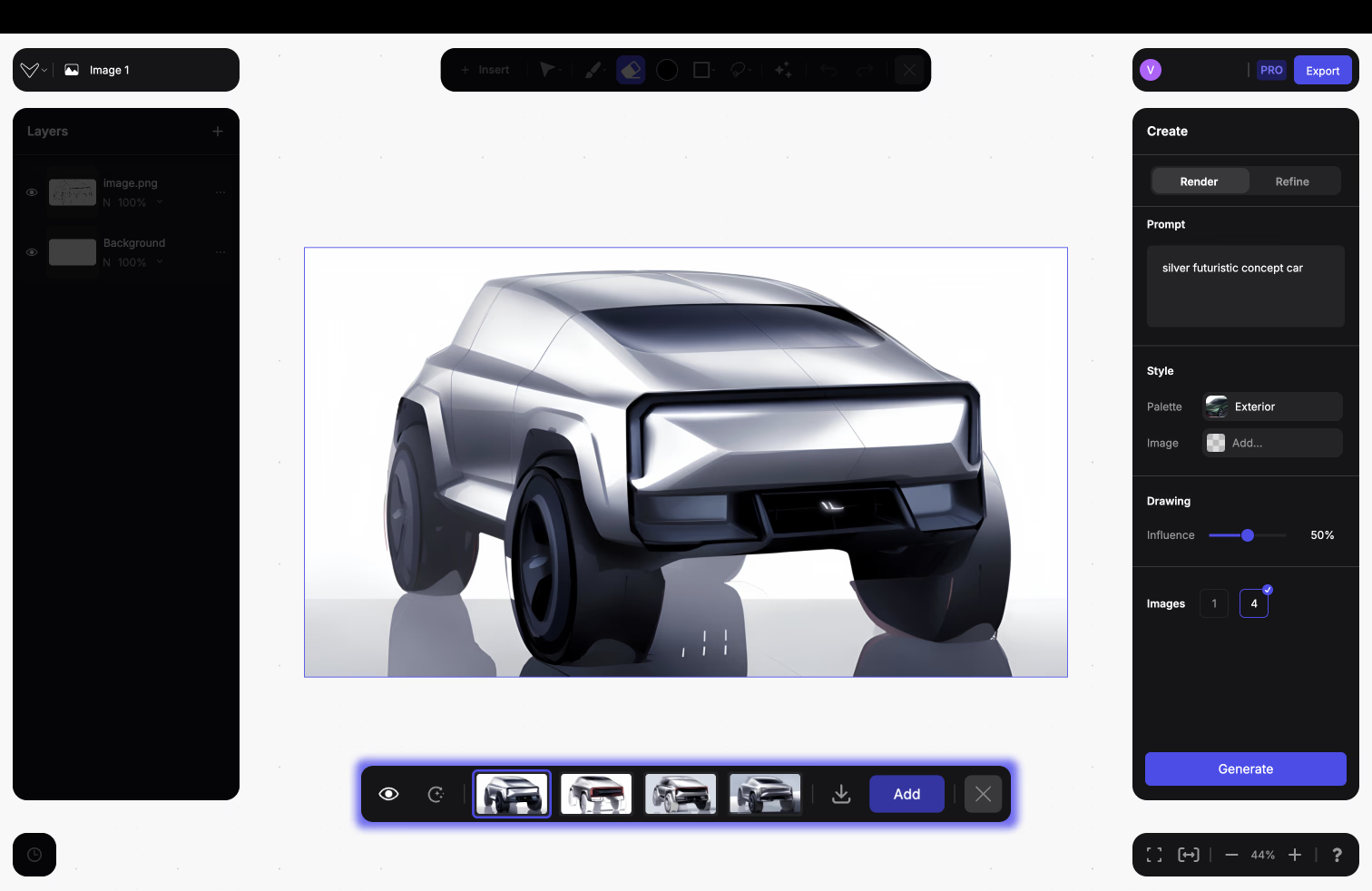
If rendering wait times are killing your ability to explore design directions, focus AI integration there before tackling CAD dependencies or documentation workflows. Prove value in a constrained scope, learn what works, then expand to adjacent bottlenecks.
Maintain explicit control over creative decisions. AI should expand what you can explore during early concept phases, not substitute for your judgment during refinement.
Build Verification Into Your Workflow
AI outputs need your review for brand alignment, manufacturing feasibility, and creative quality. When teams studied AI workflow integration for Fast Company's analysis, they emphasized that AI is "a notorious liar," making systematic verification critical.
The measured productivity gains of 40-66% only materialize when you establish review processes from the start. Those gains evaporate when teams spend extra time fixing AI mistakes instead of building review into the workflow.
The most successful integrations treat AI as a rapid visualization tool for early-stage ideation while keeping you in control of refinement and final execution.
You use AI to generate a broader set of possibilities than time would otherwise permit for exploring directions from glossy ABS to anodized aluminum, testing soft studio lighting versus dramatic side lighting, and evaluating different environmental contexts.
Then you apply your expertise to evaluate, refine, and develop the directions that work for manufacturing, brand consistency, and market viability.
Integrating AI Without Losing Creative Control
AI belongs in the early exploration phases where speed matters most, not in the refinement stages where brand alignment, manufacturability, and creative specificity require your judgment. The 45-60% of project time traditionally consumed by prototyping and refinement becomes more productive when you can visualize and evaluate more directions in the same timeline.
Vizcom Render lets you explore 50-100+ variations in the time you'd normally spend on 5-10, giving you the freedom to test directions before committing weeks to detailed development. Book a demo to see how it fits your workflow.
Explore
Explore more blog posts & resources to get inspired
.webp)
Hatch Duo is a design studio based in San Jose built around a simple premise: great products hatch when two forces meet, your insight and their execution. Hatch's focus sits squarely in consumer packaged goods. For their latest collaboration with Vizcom, industrial designer Alec Comido wanted to see what he could design in one hour.

Explore color and material variations part-by-part without leaving Vizcom.


Frequently asked questions
Yes of course! Our starter plan is completely free, no credit card required. This is a great plan to explore vizcom with.
We accept all major credit and debit cards.
Admins (paid) – can edit files, manage workspace settings, billing, teams, and invite members. Editors (paid) – can edit files but not manage settings, billing, or teams. Viewers (free) – can only view files in read-only mode.
Team billing is handled centrally by the Admin. All paid seats, whether Admins or Editors, are included in a single invoice under the same billing cycle, while Viewers remain free and do not affect the cost.
Yes, you can. An Admin can update the plan in the billing settings, and the switch will take effect on the next billing cycle at the annual rate.
Yes, you own everything you create in Vizcom. For free users, while Vizcom may use generated images to improve its services, it does not claim ownership of your designs, concepts, or original ideas—you keep full rights to them. For paid users, your images and designs remain entirely private and are only used to deliver the service. Every design, concept, and image you create or upload is fully yours and kept confidential.
Vizcom does not use your data to train AI models if you’re on a paid plan. Everything you create stays private and is only used to provide the service. Free users may have their generated images included to help improve Vizcom’s services, but even then, Vizcom does not claim ownership of your designs, concepts, or original ideas—you retain full rights.