What Is Divergent Thinking?
Divergent thinking helps designers explore more options before converging. Learn techniques like Crazy 8s and SCAMPER.

You probably already practice divergent thinking without calling it that. When you sketch eight variations of the same concept in eight minutes, brainstorm terrible ideas to understand what makes them bad, or force yourself to generate 50 ideas before evaluating any of them, you're running divergent thinking cycles.
Divergent thinking lets you push past obvious first solutions to discover directions you wouldn't have found otherwise. The structure gives you a framework with time-boxed ideation rounds, explicit quantity targets, or prompts applied to existing solutions, making exploration deliberate rather than accidental.
This article covers the divergent thinking process, practical techniques like Crazy 8s and SCAMPER, and the barriers that prevent teams from exploring enough options before converging.
What Is Divergent Thinking in Design?
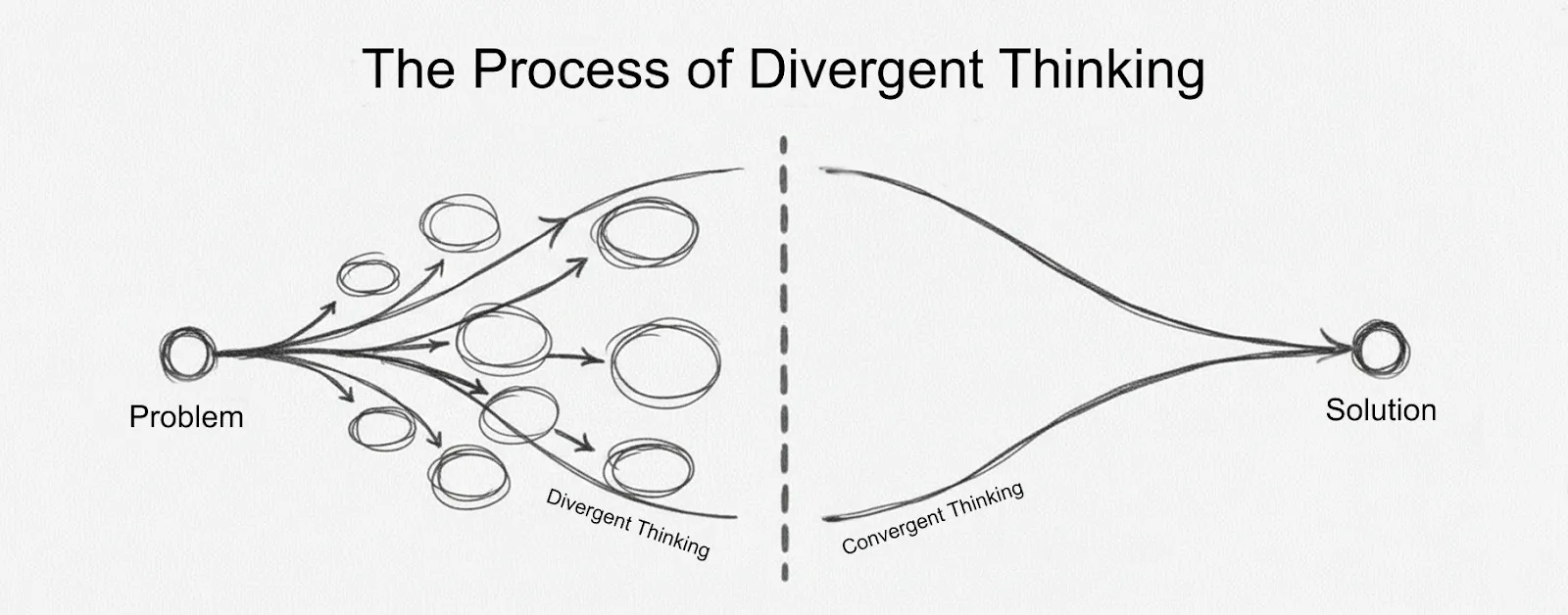
Divergent thinking is an ideation mode where you intentionally expand your design options before narrowing down to a solution. You force yourself to explore multiple directions, generate alternatives, and push past obvious answers rather than latching onto the first workable idea.
Most designers already know how to think divergently. The constraint isn't the mental process itself but the time it takes to execute each iteration. When rendering a single variation takes hours, you can only afford to explore a handful of directions. When production time drops to seconds, you can run the exploration cycles you've always wanted to run.
Why Divergent Thinking Matters in Design
Divergent thinking can produce better design outcomes because it prevents you from settling on the first workable solution. When you generate many options before evaluating any of them, you discover directions you may not have found otherwise, which lets you make more informed decisions about which concepts to develop.
For example, Nike generated hundreds of designer-created visuals using AI acceleration for each athlete before converging to 13 prototypes that underwent testing and refinement. That approximately 15:1 to 20:1 exploration ratio demonstrates how professional teams often work when they have resources to explore properly.
Generating more options reveals patterns across them that single concepts don't generally show. You discover which directions feel forced and which ones have momentum. You catch yourself gravitating toward the same solutions and can consciously push elsewhere.
In other words, divergent thinking prevents premature convergence.
The Divergent Thinking Process
The divergent thinking process is generally divided into four distinct phases that alternate between expanding exploration and narrowing focus. Start by exploring the problem space broadly, converge to define what you're solving, diverge again to generate and test solutions, then converge to refine and deliver.
Consider and Frame the Problem
This phase focuses on understanding who you're designing for and what they need before generating solutions. Exploring the problem space means spending time understanding user needs rather than jumping straight to ideas about what to build.
The "How Might We" framing technique turns problems into questions that open up ideation. Instead of "We need a better checkout process," you'd frame it as "How might we help rushed shoppers complete purchases confidently?" The shift from statement to question creates psychological permission to explore multiple answers rather than defending a predetermined direction.
User research, interviews, and observation help you understand the full scope of what you're solving before you commit to how you'll solve it. The output is a clear problem statement that gives you direction without prescribing the solution.
Generate Ideas (Quantity Over Quality)
Setting quantity targets and deferring judgment until after ideation prevents the unconscious self-censorship that blocks creative flow. When you delay critique until after the divergent phase, you can explore beyond familiar patterns because you're not simultaneously protecting yourself from criticism.
Specific targets like "generate 50 ideas in 30 minutes" or "eight sketches in eight minutes" remove the option to stop early. Try it — you might find that you or your team hits obvious solutions more quickly, pushes through a frustrating middle phase where everything feels derivative, and occasionally breaks through to something unexpected.
Two techniques you can employ at this stage are Crazy 8s and the Worst Possible Idea.
To implement Crazy 8s, fold a piece of paper into eight sections, set a timer for eight minutes, and force yourself or your team to produce one sketch per minute. The time pressure prevents perfectionism and forces you to capture the core idea and move on.
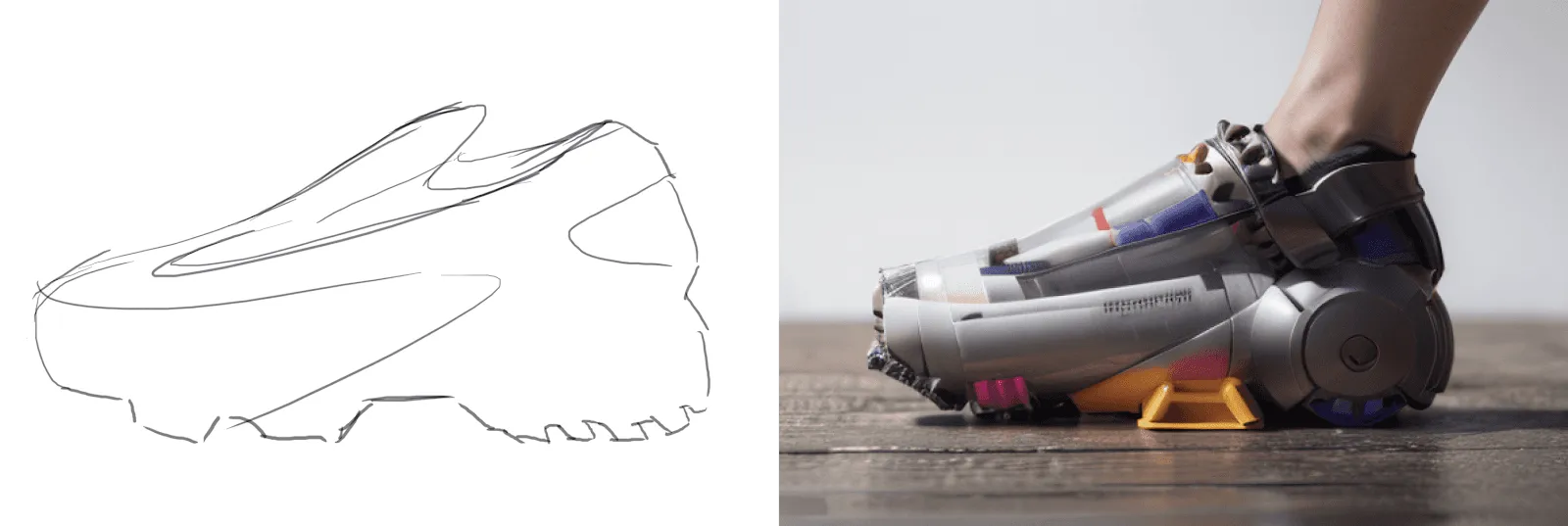
After you have your eight sketches, consider turning them into photorealistic outputs in seconds with Render, then compare design directions visually rather than evaluating them as abstract sketches. You can also try Make 3D to convert those renders into textured meshes you can rotate and export, so you can evaluate form from every angle before committing to detailed CAD work.
The Worst Possible Idea technique removes psychological barriers by making terrible solutions the explicit goal. When you ask "What's the worst possible solution?" you eliminate the weight of needing every idea to be good. You identify what makes solutions terrible, then reverse-engineer those constraints to understand what good looks like.
Present and Evaluate
After generating ideas, narrow them down using three criteria: desirability, feasibility, and viability. Designers cluster similar ideas from the divergent phase to identify patterns and understand what themes emerged across all that exploration. Only then can you narrow from broad problem space to specific, solvable challenges.
Design critique at this stage focuses on evaluation criteria, not personal preferences. These three key filters help you narrow from dozens of raw concepts to a handful worth developing further:
- Desirability: Does this direction address the problem you defined?
- Feasibility: Is it technically feasible with available resources?
- Viability: Does it align with business constraints?
Understanding how each criterion applies to your specific project prevents defaulting to personal preference over strategic evaluation.
Many designers avoid showing rough work because they've already invested emotional effort in polishing concepts, making cutting them feel like lost investment. The solution is to create rough sketches that signal "this is exploratory" to both you and whoever reviews it.
Presenting multiple options together reveals their relative strengths better than sequential review. When you see six variations side by side, differences become obvious.
Diverge Again
Most teams skip this critical phase. They pick a direction in the first convergence and move straight to execution. A second divergence explores variations and refinements of your selected concepts through prototyping and real-world feedback. This distinction separates novice from expert design practice, as it lets you iterate based on actual user response rather than assumption-based execution.
Take the two or three strongest ideas from the first convergence and push on them. What if you adjusted the proportions? Changed the material? Inverted the hierarchy? Combined elements from two different concepts? This second divergence phase often produces refined solutions because you're exploring variations of selected concepts rather than generating raw ideas from scratch.
Testing drives this divergence. Put rough prototypes in front of users and watch what breaks. Maybe the interaction pattern that seemed elegant doesn't make sense to anyone outside your team. Or the visual approach that felt distinctive just looks unfinished. Or something you thought was a minor detail turns out to be the most compelling aspect.
When sketch-to-render workflows dramatically accelerate visualization, designers can explore more divergent alternatives before converging.
Converge to Your Solution
The final convergence refines your selected direction through structured validation and refinement. Ensure the solution meets all three criteria: desirability, feasibility, and viability. This phase prepares the design for implementation with complete documentation, ready to move from design thinking into execution.
This phase focuses on execution quality. Making sure interactions are polished, visual details are consistent, edge cases are handled, and technical specifications are complete. You're still iterating, but within a much smaller solution space than the earlier phases.
Recognizing when you're done with divergence and ready for convergence matters. Teams that keep exploring indefinitely never ship. Teams that converge too early ship mediocre work. The structure helps you make that transition consciously rather than accidentally.
4 Practical Techniques for Divergent Thinking
These four techniques make divergence actionable rather than aspirational. Each one addresses a different barrier: time pressure, creative blocks, psychological resistance, or feeling stuck without direction.
1. Crazy 8s
Crazy 8s forces volume and speed by requiring eight ideas in eight minutes, one per section of folded paper. The format works particularly well for UI sketches and product concepts because the strict time constraints break through creative blocks and prevent perfectionism.
2. Rough-to-Refined Sketching
Start with several rough sketches exploring different solution directions, then selectively refine the most promising concepts into detailed sketches. This workflow prevents the common trap of polishing a single idea before you've explored alternatives.
3. Worst Possible Idea
Flip brainstorming by making terrible solutions the explicit goal. Generate 15 to 20 deliberately bad ideas, then identify what makes each one terrible. Those insights reveal your real constraints and requirements more clearly than trying to articulate good solutions directly.
4. SCAMPER
SCAMPER provides structured prompts when creative flow isn't happening naturally. The prompts are Substitute, Combine, Adapt, Modify, Put to another use, Eliminate, and Reverse. Apply each prompt to existing solutions to generate alternatives systematically.
What Prevents Divergent Thinking
Six primary barriers prevent effective divergent thinking. These barriers compound when multiple factors occur simultaneously, requiring both structural changes and cultural shifts to address.
- Fear of showing rough work makes designers prematurely polish individual concepts instead of exploring alternatives.
- Premature convergence under pressure happens when teams lock onto the first acceptable solution because stakeholders want visible progress and deadlines approach.
- Time pressure and deadline constraints compress timelines until divergent phases disappear entirely, moving directly from problem definition to execution.
- Insufficient iteration cycles mean designs never progress beyond initial concepts because compressed schedules eliminate the testing loops that turn decent concepts into strong solutions.
- Technical and workflow constraints prevent rapid exploration when rendering each variation takes hours rather than seconds.
- Organizational and process constraints create risk-averse cultures where rigid approval processes and workplace pressures inhibit risk-taking.
When sketch-to-render workflows reduce rendering from hours to seconds, production speed stops being the constraint. You can actually explore the 15:1 exploration ratios that professional teams practice when they have resources to explore properly.
Making Divergent Thinking Work for You
Divergent thinking follows a pattern: expand options, then narrow choices. Structured techniques like Crazy 8s, SCAMPER, and Worst Possible Idea force quantity and prevent teams from settling on the first workable idea.
Speed makes this practical. Render turns sketches into photorealistic output in seconds, so you can compare eight design directions visually instead of evaluating abstract sketches. Make 3D converts those renders into textured meshes you can rotate and export before committing to detailed CAD work.
Try setting a minimum before evaluating anything: eight sketches in eight minutes, six variations before critique, or a hundred sketches before lunch. The specific number matters less than forcing volume before judgment.
Try Vizcom free and run divergent thinking cycles without rendering speed holding you back.
Explore
Explore more blog posts & resources to get inspired
.webp)
Hatch Duo is a design studio based in San Jose built around a simple premise: great products hatch when two forces meet, your insight and their execution. Hatch's focus sits squarely in consumer packaged goods. For their latest collaboration with Vizcom, industrial designer Alec Comido wanted to see what he could design in one hour.

Explore color and material variations part-by-part without leaving Vizcom.


Frequently asked questions
Yes of course! Our starter plan is completely free, no credit card required. This is a great plan to explore vizcom with.
We accept all major credit and debit cards.
Admins (paid) – can edit files, manage workspace settings, billing, teams, and invite members. Editors (paid) – can edit files but not manage settings, billing, or teams. Viewers (free) – can only view files in read-only mode.
Team billing is handled centrally by the Admin. All paid seats, whether Admins or Editors, are included in a single invoice under the same billing cycle, while Viewers remain free and do not affect the cost.
Yes, you can. An Admin can update the plan in the billing settings, and the switch will take effect on the next billing cycle at the annual rate.
Yes, you own everything you create in Vizcom. For free users, while Vizcom may use generated images to improve its services, it does not claim ownership of your designs, concepts, or original ideas—you keep full rights to them. For paid users, your images and designs remain entirely private and are only used to deliver the service. Every design, concept, and image you create or upload is fully yours and kept confidential.
Vizcom does not use your data to train AI models if you’re on a paid plan. Everything you create stays private and is only used to provide the service. Free users may have their generated images included to help improve Vizcom’s services, but even then, Vizcom does not claim ownership of your designs, concepts, or original ideas—you retain full rights.