Digital Car Design: How Studios Use 3D from Day One
Discover how modern car design studios use 3D tools to go from concept phase to final product.

Digital car design means using 3D modeling software from the earliest concept phases rather than waiting until engineering development. Companies adopted this approach because it speeds up iteration and reveals design problems earlier in the process.
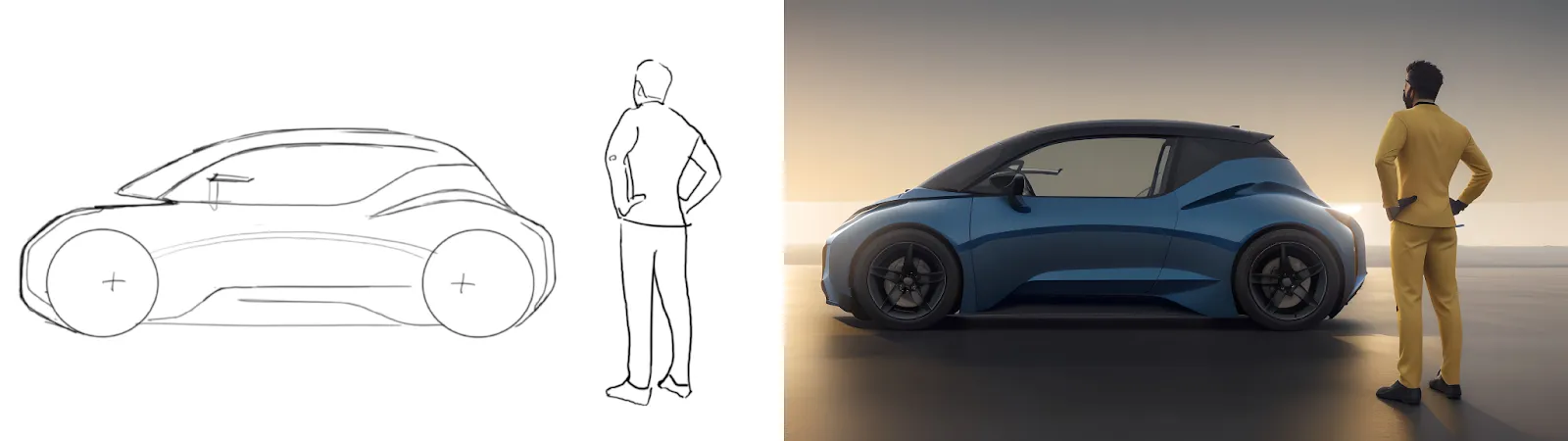
This shift happened gradually over the past five years, as real-time rendering technology matured. What used to take hours now happens instantly. Designers can see photorealistic surfaces and lighting while they're still exploring concepts, not after they've committed to a direction.
The interesting reality is that studios haven't abandoned traditional methods. Ford and Pininfarina, for example, still use clay modeling alongside their digital tools. Ford brought VR headsets into design studios. Ford designers now use VR for their workflow, indicating enterprise-wide adoption rather than pilot programs. Pininfarina built what they call "phygital" tools combining virtual reality with configurable physical seating areas.
This article examines how professional studios actually implement digital workflows, what software they use, and why the hybrid approach emerged as the industry standard.
The Shift From Linear Pipelines to Live Workflows
Traditional automotive design followed a linear path. You sketched concepts, selected direction, built clay models, refined surfaces, then moved to CAD for engineering. Each phase happened sequentially, with limited opportunity to revisit earlier decisions without restarting the entire process.
But digital tools changed when and how you validate design decisions. You can now test ideas in 3D while you're still sketching, see photorealistic renders while you're adjusting surfaces, and evaluate ergonomics before committing to physical prototypes. The automotive design workflow is now iterative rather than linear, with continuous feedback loops replacing sequential handoffs.
All that said, leading digital car design studios still use clay models. They just use it in conjunction with more flexible rendering technology, integrating digital tools with physical modeling to create faster, more responsive workflows. In other words, digital tools can't replicate everything you need to evaluate form, so leading studios digitally enhance clay modeling rather than eliminate it.
For example, Jaguar Land Rover makes extensive use of clay in design and development. They've built sophisticated hybrid systems where digital and physical evaluation happen simultaneously.
Here's how studios integrate physical and digital evaluation:
- Digital overlay capabilities: VR integration stitches real-life 3D clay interior models into digital worlds for enhanced evaluation
- Team collaboration: Designers and ergonomics teams work together in phygital environments testing both form and function
- Enhanced validation: Physical models enhanced with digital overlays preserve hands-on evaluation while adding data-driven testing
This "phygital" approach helps you evaluate both form and ergonomics simultaneously without sacrificing the design refinement capabilities that physical clay modeling provides.
The Four Tools Running Modern Car Design
Walk into a professional automotive design studio and you'll find a consistent technology foundation. The tools haven't changed dramatically, but how you use them has.
Here's what powers modern automotive design:
- Surface modeling software: NURBS-based tools handling complex automotive curves and A-surface continuity
- Real-time visualization platforms: Virtual prototyping with accurate material representation
- Material libraries: Automotive-specific assets including car paints, leathers, plastics, textiles, and composites with procedural generation capabilities
- Sketch-to-render tools: Platforms that convert concept sketches into photorealistic renderings in seconds
These tools work together to enable immediate feedback. Surface modeling software lets you adjust curves and see the changes instantly. Real-time visualization platforms show you how those surfaces look under different lighting conditions without waiting for renders. Material libraries let you test different finishes on the fly. Sketch-to-render tools convert your rough concepts into photorealistic images in seconds, helping you evaluate direction before investing time in detailed modeling.
Sequential workflows have given way to feedback loops where design validation happens during modeling rather than after completion.
Why Real-Time Rendering Changed Iteration Forever
Real-time rendering changed iteration by collapsing the feedback loop from hours to seconds.
Traditional rendering took hours per concept. Designers chose direction based on incomplete information and gut feel. By the time they saw photorealistic results, they'd already committed to a direction. Real-time rendering delivers instant photorealistic feedback while designers explore concepts. Designers adjust a surface, the lighting updates immediately, and they can see whether that character line works before investing hours in refinement.
Vizcom's sketch-to-render capabilities take this further, converting rough sketches to photorealistic output in seconds. This acceleration moved design decisions from late-stage validation to early-stage exploration. The old workflow forced designers to commit to direction, build it out, then validate. The new workflow lets designers validate direction before committing. There's no more "we'll polish it at the end" because designers see polished results throughout the process.
The speed improvements translate to measurable development cycle reductions. McKinsey's analysis shows China's electric vehicle-focused automakers using modern digital approaches achieve development cycles of approximately 24 months from concept to launch, compared to legacy automaker timelines of 40 to 50 months using traditional processes. That's roughly 50% cycle time reduction.
However, these metrics reflect overall product development transformation, including agile methodologies, organizational structure, digital twins, and simulation, rather than 3D workflow adoption alone. That said, while you can't attribute the entire improvement to using 3D from day one, digital workflows serve as a foundational element.
Preserving Design Intent in a Nonlinear Pipeline
Preserving design intent in digital car design means maintaining the original character and proportions of a concept as it moves through three-dimensional modeling, rendering, and validation tools from the earliest stages. Because digital car design relies on continuous iteration rather than discrete handoffs, intent must operate as a constant reference across the entire workflow.
As digital feedback cycles shorten, designers make more decisions earlier and across a wider range of software tools. Collaboration also begins sooner, often while forms are still fluid. This pace speeds up evaluation and reduces rework, but also increases the likelihood that a design drifts as it moves between sketches, surfaces, renders, and simulations.
Professional automotive studios manage this risk by treating the initial sketch as a stabilizing reference within digital workflows. Even when teams move quickly into 3D, the sketch remains the clearest expression of proportions, stance, and character. Consistent reference to that sketch limits stylistic drift and keeps digital iteration aligned with the original concept.

Modern digital tools have largely removed speed as a bottleneck. The remaining challenge lies in carrying the proportions and tension of a sketch through surface development without allowing modeling convenience or software defaults to reshape the design. This requires establishing structure early so surfaces evolve from intent rather than from technical constraints imposed by the tools themselves.
As digital workflows become faster and more automated, this discipline matters more. AI-assisted tools only add value when they reinforce a studio’s design language instead of diluting it. Tools such as Custom Palettes address this need by embedding brand-specific surface treatments, visual cues, and aesthetic preferences directly into the rendering process. When models train on a defined visual vocabulary, outputs remain consistent even as designers explore more variations in less time.
Designers interviewed by DEVELOP3D describe this continuity as a decisive factor in what reaches production. One notes that the ability to “really maintain design intent, from the sketch” carries through to manufacturing and directly shapes the styling language of vehicles that reach market. In digital car design, faster iteration produces stronger results only when intent remains intact. Without it, designs may meet technical requirements while lacking identity.
What This Shift Demands From Designers (Spoiler: Not More Software)
Digital car design changes how designers work day to day. Sketching, modeling, and rendering now happen in parallel, often within the same session. The challenge is maintaining design intent as you move between tools and representations.
Even with capable tools, adoption remains difficult. A Car Design News interview with Eric Stoddard highlights that designers struggle not because software lacks features, but because integrating new tools into daily practice requires new ways of working. Stoddard's training approach integrates VR sketching with tools like Vizcom so new methods extend existing habits rather than replace them.
At the industry level, these workflows now operate at scale. Coverage from GTC 2024 shows BYD, Geely, Li Auto, and NIO building next-generation EVs on NVIDIA's platforms, signaling that digital-first workflows have moved from experimentation to production.
For individual designers and smaller studios, the path looks different. Real-time rendering remains the most accessible entry point. Sketch-to-render tools offer immediate visual validation early in the process, while 2D-to-3D generation requires stronger training frameworks to integrate smoothly.
Across studios of all sizes, the same pattern holds: digital car design works best when new tools extend existing processes rather than replacing them.
Choosing Tools That Fit Your Workflow
Digital car design works when tools extend how you already think and work. Real-time rendering collapsed feedback loops from hours to seconds. Hybrid "phygital" approaches let studios keep clay modeling while adding digital evaluation. Blender's adoption signals that interoperability matters more than any single platform. Tools that require you to change your process rarely stick. Tools that shorten the distance between sketch and validated concept do.
Vizcom fits this model. Render turns sketches into photorealistic output in seconds, so you can evaluate direction before committing to detailed modeling. Make 3D generates textured meshes from 2D renderings for 360-degree evaluation or export to 3D printing. Custom Palettes train on your brand's visual language, keeping outputs consistent even during rapid exploration. And because Vizcom accepts live sketching, uploads, and reference images, you're not locked into a single input type.
Explore
Explore more blog posts & resources to get inspired
.webp)
Hatch Duo is a design studio based in San Jose built around a simple premise: great products hatch when two forces meet, your insight and their execution. Hatch's focus sits squarely in consumer packaged goods. For their latest collaboration with Vizcom, industrial designer Alec Comido wanted to see what he could design in one hour.

Explore color and material variations part-by-part without leaving Vizcom.


Frequently asked questions
Yes of course! Our starter plan is completely free, no credit card required. This is a great plan to explore vizcom with.
We accept all major credit and debit cards.
Admins (paid) – can edit files, manage workspace settings, billing, teams, and invite members. Editors (paid) – can edit files but not manage settings, billing, or teams. Viewers (free) – can only view files in read-only mode.
Team billing is handled centrally by the Admin. All paid seats, whether Admins or Editors, are included in a single invoice under the same billing cycle, while Viewers remain free and do not affect the cost.
Yes, you can. An Admin can update the plan in the billing settings, and the switch will take effect on the next billing cycle at the annual rate.
Yes, you own everything you create in Vizcom. For free users, while Vizcom may use generated images to improve its services, it does not claim ownership of your designs, concepts, or original ideas—you keep full rights to them. For paid users, your images and designs remain entirely private and are only used to deliver the service. Every design, concept, and image you create or upload is fully yours and kept confidential.
Vizcom does not use your data to train AI models if you’re on a paid plan. Everything you create stays private and is only used to provide the service. Free users may have their generated images included to help improve Vizcom’s services, but even then, Vizcom does not claim ownership of your designs, concepts, or original ideas—you retain full rights.