
Design Infrastructure: The Systems That Let You Actually Design
Design infrastructure determines whether your team designs or coordinates. Learn about them to remove rendering bottlenecks.

You sketch something, it feels wrong, so you try again. Maybe the proportions are off, or the form language doesn't match what you're seeing in your head. This process of validating your design and getting feedback is where the actual work happens.
But most of your time gets eaten by everything around that creative work. At best, you spend your time searching for the right file version or waiting for rendering feedback. At worst, you’ll find yourself explaining the same design decision to three different people and recreating a component someone already built because you couldn't find it.
Read on to learn more about design structure — i.e., design systems, file organization, handoff processes, and the rendering constraints that limit exploration.
What Is Design Infrastructure
Design infrastructure is the standardized processes, systems, and tools that support design work and allow it to scale efficiently.
It has three parts working together:
- People and culture that protect creative time
- Processes that create repeatable systems for getting work done
- Tools that connect everything
When infrastructure works, you barely notice it. When it doesn't, it consumes the time you need for actual design thinking.
Why Design Infrastructure Matters
Infrastructure determines whether designers spend time creating or coordinating. When teams scale without proper systems, designers spend more time navigating chaos than actually designing.
Teams without infrastructure hit predictable bottlenecks. Version control chaos emerges when designers work on overlapping files without coordination systems. Collaboration breakdowns happen when design and development timelines don't sync.
What Makes a Design System Complete
Implementing a component library isn't the same as having a complete design infrastructure. Teams often mistake one piece for the whole picture.
As Brad Frost notes: "Code really is the source of truth in a design system, so the Figma library is really a contract or a promise of what's available in code."
Design Tokens
Design tokens are elements that point to style values in colors, fonts, and measurements. Use tokens instead of hardcoded values to maintain consistency and enable systematic updates.
Tokens operate in three levels:
Component vs. Pattern Libraries
Component libraries focus on individual UI elements such as buttons, input fields, and cards. The reusable building blocks.
Pattern libraries document how components work together in common workflows. They focus on combinations, not individual elements.
Style guides provide the rulebook (i.e., color codes, usage guidelines, and spacing rules).
You need all three functioning together.
Naming Conventions
Naming conventions determine whether your system scales or becomes a maintenance nightmare.
Name based on purpose rather than appearance. Using color-action-primary instead of color-blue means you can evolve the design without breaking implementations across your codebase.
Hierarchical structures like category-subcategory-state provide clarity. When a button is named Button/Primary/Default in Figma and button-primary-default in code, developers immediately understand the component structure without translation layers.
How to Organize Files at Scale
File organization determines whether teams spend time creating or searching. Without intentional structure, file chaos becomes the bottleneck that slows everything else.
Folder Structure
Design teams need hierarchical folders organized by functional purpose, not just project names.
Here’s an example of a practical system:
- _Template folders — Repeatable work like social images
- _Active folders — All current work in progress
- Product folders — Features organized by type
- Completed work migrates from Active folders to prevent bloat
Execute folder reorganizations during low-activity periods, like over a weekend to avoid disrupting active work.
File Naming
Keep file names under 200 characters. Use underscores or hyphens instead of spaces for cross-platform compatibility.
Descriptive names with context work better than generic labels:
- ✅ ProductRender_SneakerV3_2024-12-15.png
- ❌ final-final-REAL.png
Version Control
Design version control works differently from code repositories. Creative teams need review and approval workflows that make the process transparent for stakeholders, like emphasis on visual feedback, compliance, and auditing capabilities.
How to Hand Off Designs Effectively
Getting designs from Figma to production requires more than dropping files over the wall. Effective handoff is continuous communication and knowledge transfer.
Specification Documentation
Comprehensive specs must address responsive design, component structure, interaction states, and animation behaviors.
For responsive layouts, developers need to ensure designs render properly in the space between breakpoints—not just at fixed widths. Document flexible layout behaviors, not just mockups at specific sizes.
Annotations
Rather than annotating everything, focus on:
- Complex interactions that aren't visually obvious
- Conditional states and their triggers
- Animation timing and easing functions
- Responsive behavior that differs from typical patterns
This contextual information helps developers make appropriate judgment calls within real code constraints.
Design QA
Initiate conversations about including Design QA time during early project stages—before requirements are finalized. This ensures QA isn't treated as an optional final step.
Design QA should complement existing QA processes. Designers doing their own pass from a different angle can spot front-end details that others might miss.
The Rendering Bottleneck
One infrastructure problem deserves separate attention because it directly limits design exploration.
Traditional rendering constraints mean extended wait times between concept iterations. This slow evaluation cycle forces teams to choose conservative directions because they can't afford to fully develop ideas that might not work.
Architecture and product design firms feel this especially hard. When rendering takes hours per concept, you explore only the directions you're already confident about.
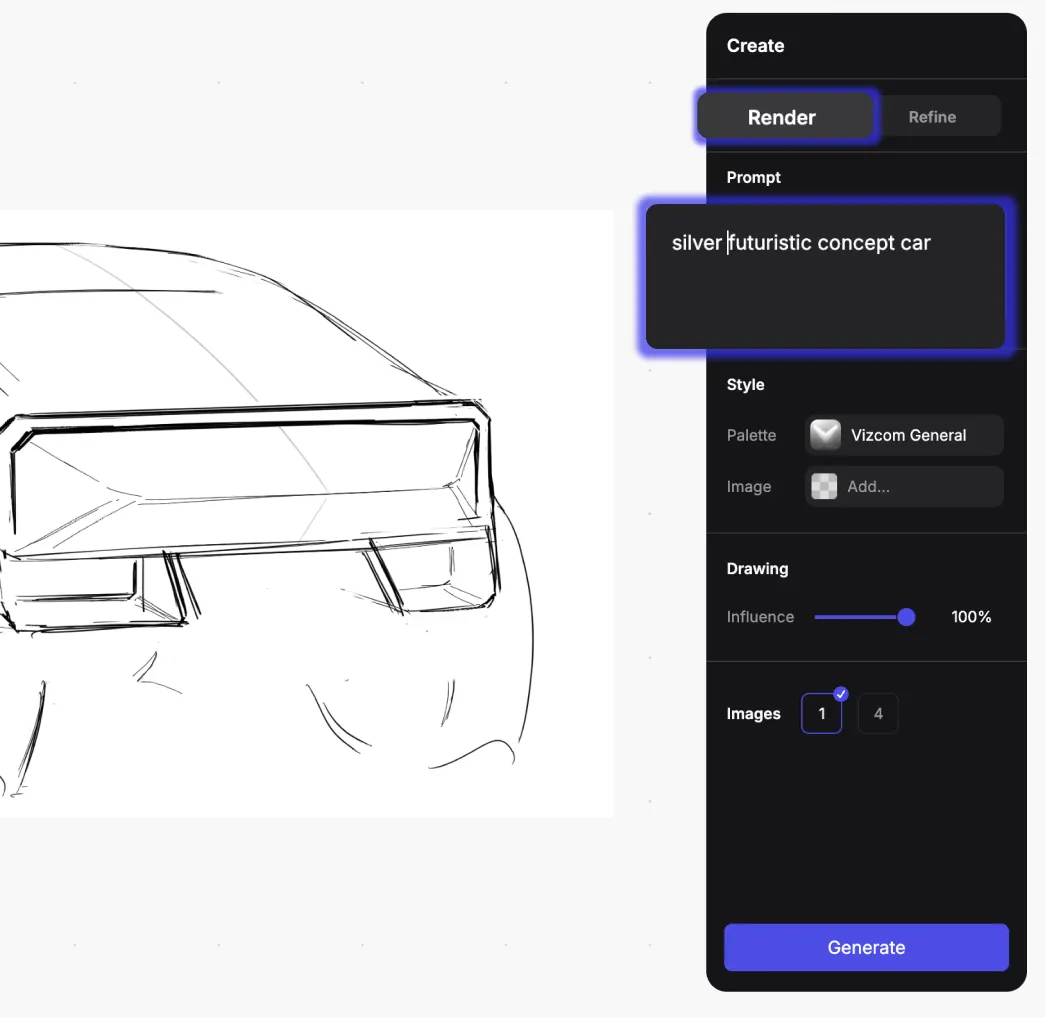
This is the infrastructure problem Vizcom specifically addresses.
The Render feature generates photorealistic output in seconds. Evaluate whether brushed aluminum with soft studio lighting or matte ABS plastic with dramatic side lighting works better for the form language—before committing to detailed CAD work.
When you can see what works quickly, you make better decisions about which direction to pursue. You're not guessing which concepts deserve development time.
Make 3D feature converts 2D renderings into textured meshes. Rotate designs 360 degrees to verify form language from every angle, or export as glTF files for AR presentations and 3D printing prototypes. This keeps the workflow moving from sketch to render to dimensional evaluation without switching tools.
How To Build a Useful Infrastructure
Infrastructure investments pay off when they remove obstacles to creativity rather than imposing process overhead.
The clearest sign you need improvements is when coordination overhead consumes more time than creative work. When designers spend hours searching for files, recreating work that already exists, or explaining the same context repeatedly—those are infrastructure problems masquerading as individual inefficiencies.
Start with Measurement
Document where time actually goes. Track how long designers spend on creative work versus coordination, file management, or rework caused by inconsistent systems.
Nielsen Norman Group's REACH framework provides structure for measuring design operations success across Results, Efficiency, Ability, Clarity, and Health.
Match Solutions to Bottlenecks
Choose improvements based on your specific constraints:
- If version control chaos creates duplicate work, then better file organization and naming conventions
- If coordination failures cause implementation errors, then turn to structured documentation and design QA integration
- If rendering time limits exploration, then use tools that accelerate visualization
The infrastructure that works best feels invisible when functioning properly. You notice it by what stops happening: fewer urgent file recovery requests, less time explaining design decisions, fewer implementation bugs from ambiguous specifications.
Your team ships work faster and with less friction—which means more time exploring directions that might actually be interesting.
Protect Time for Work That Matters
Good infrastructure feels invisible when it's working. You notice it by what stops happening. Your team ships work faster and with less friction, which means more time exploring directions that might actually be interesting.
If rendering bottlenecks limit your team's exploration, book a demo to see how Vizcom accelerates the visualization stage of your workflow.
Explore
Explore more blog posts & resources to get inspired
.webp)
Hatch Duo is a design studio based in San Jose built around a simple premise: great products hatch when two forces meet, your insight and their execution. Hatch's focus sits squarely in consumer packaged goods. For their latest collaboration with Vizcom, industrial designer Alec Comido wanted to see what he could design in one hour.

Explore color and material variations part-by-part without leaving Vizcom.


Frequently asked questions
Yes of course! Our starter plan is completely free, no credit card required. This is a great plan to explore vizcom with.
We accept all major credit and debit cards.
Admins (paid) – can edit files, manage workspace settings, billing, teams, and invite members. Editors (paid) – can edit files but not manage settings, billing, or teams. Viewers (free) – can only view files in read-only mode.
Team billing is handled centrally by the Admin. All paid seats, whether Admins or Editors, are included in a single invoice under the same billing cycle, while Viewers remain free and do not affect the cost.
Yes, you can. An Admin can update the plan in the billing settings, and the switch will take effect on the next billing cycle at the annual rate.
Yes, you own everything you create in Vizcom. For free users, while Vizcom may use generated images to improve its services, it does not claim ownership of your designs, concepts, or original ideas—you keep full rights to them. For paid users, your images and designs remain entirely private and are only used to deliver the service. Every design, concept, and image you create or upload is fully yours and kept confidential.
Vizcom does not use your data to train AI models if you’re on a paid plan. Everything you create stays private and is only used to provide the service. Free users may have their generated images included to help improve Vizcom’s services, but even then, Vizcom does not claim ownership of your designs, concepts, or original ideas—you retain full rights.