Introducing Add-ons: a more flexible way to create in Vizcom
Add-ons and the new Premium Usage Dashboard give you more control over how and when you create in Vizcom, removing hard limits and making premium usage flexible. Top up actions when you need them, track everything in one clear view, and keep your creative flow moving without interruption.

Introducing Add-ons and the Premium Usage Dashboard
Creative flow is all about freedom and these two new features were built to give you more control to keep that flow going — giving you the insight into your actions and the ability to top up whenever you need more.
Add-ons: keep creating and top up when you need
Until now, Vizcom had hard limits on premium actions like 3D generations and animations. Once you hit your cap, you had to wait for the next billing cycle to start again.
Today, those limits are gone.
Now, your premium usage is now pooled together, so you can use your actions however you like — a mix of 3D generations and animations, or all-in on one. With Add-ons, you top up by purchasing extra premium actions whenever you need them, one time purchases that let you generate more, instantly.
Here’s how it works:
- Pro users can buy Add-ons anytime to top up their usage and keep creating without interruption.
- Free users can upgrade to a Pro plan once they reach their monthly premium usage capacity to unlock Add-ons and access even more premium actions.
- Any unused premium actions from an Add-on purchase will carry over to the next month, so nothing goes to waste.
- Each billing cycle resets your base premium usage automatically, giving you more creative capacity every month.
A clearer view of your premium usage
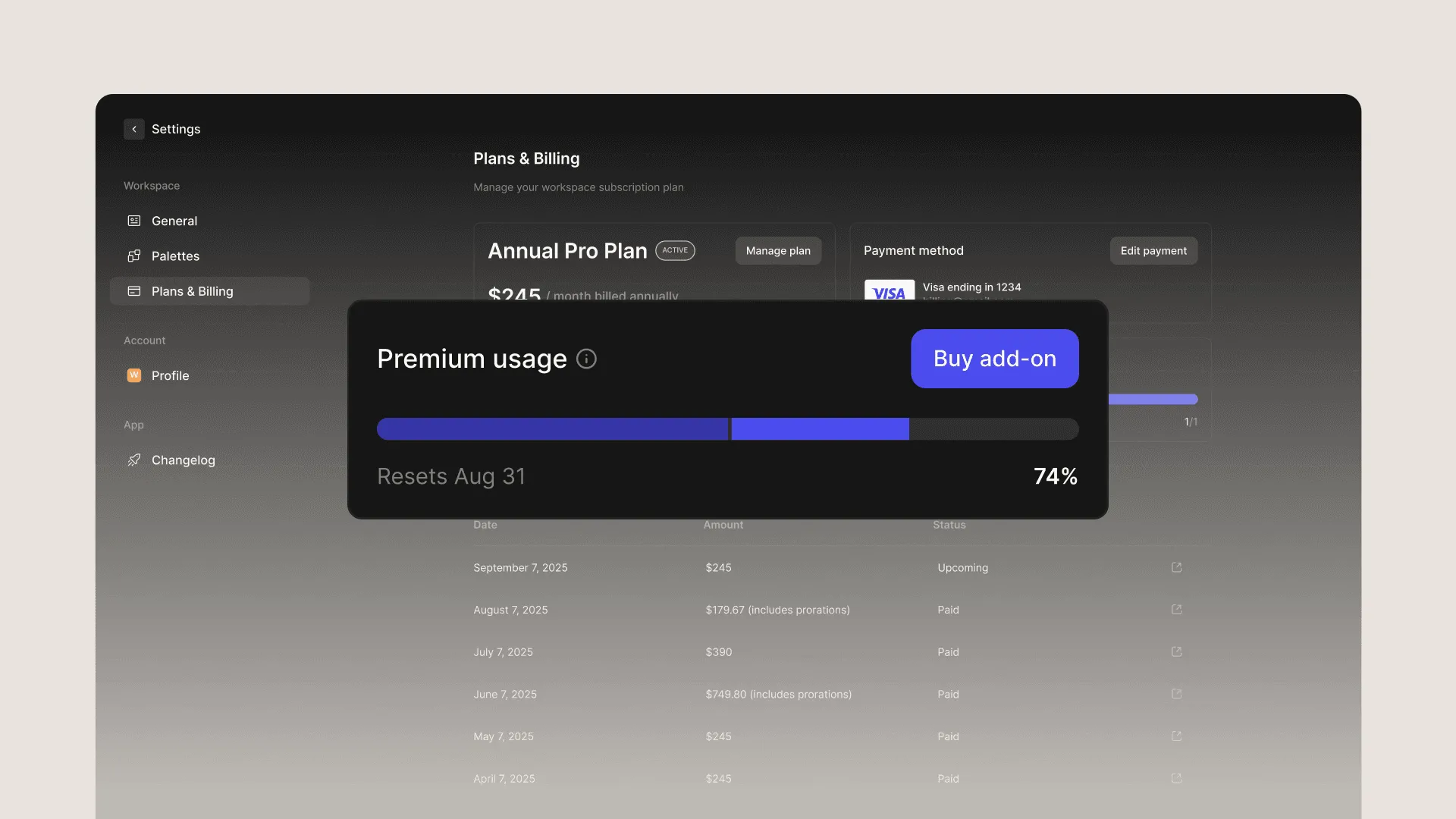
The new Premium Usage Dashboard can be found in your workspace under the Plans & Billing tab, available for all free and pro plans.
The dashboard makes it easy to track your usage, including 3D generations and animations. No more guessing how much you’ve used or wondering what’s left.
Available now
This rollout marks the first step toward a more flexible way to work in Vizcom, and whether you’re on a Free or Pro plan, Add-ons are ready when you are. Pro users can grab more actions anytime, and Free users can upgrade once they’re ready for more.
Have feedback? DM us or drop a note in our Discord — we’re listening.
Explore
Explore more blog posts & resources to get inspired
.webp)
How Berlin-based designer Julius transformed a metal exhaust pipe into a bespoke tealight holder—and used Vizcom to sharpen the vision before building it.
.webp)

Frequently asked questions
Lorem ipsum dolor sit amet, consectetur adipiscing elit sed do eiusmod tempor incididunt ut labore.
Yes of course! Our starter plan is completely free, no credit card required. This is a great plan to explore vizcom with.
We accept all major credit and debit cards.
Admins (paid) – can edit files, manage workspace settings, billing, teams, and invite members. Editors (paid) – can edit files but not manage settings, billing, or teams. Viewers (free) – can only view files in read-only mode.
Team billing is handled centrally by the Admin. All paid seats, whether Admins or Editors, are included in a single invoice under the same billing cycle, while Viewers remain free and do not affect the cost.
Yes, you can. An Admin can update the plan in the billing settings, and the switch will take effect on the next billing cycle at the annual rate.
Yes, you own everything you create in Vizcom. For free users, while Vizcom may use generated images to improve its services, it does not claim ownership of your designs, concepts, or original ideas—you keep full rights to them. For paid users, your images and designs remain entirely private and are only used to deliver the service. Every design, concept, and image you create or upload is fully yours and kept confidential.
Vizcom does not use your data to train AI models if you’re on a paid plan. Everything you create stays private and is only used to provide the service. Free users may have their generated images included to help improve Vizcom’s services, but even then, Vizcom does not claim ownership of your designs, concepts, or original ideas—you retain full rights.